
Kevin
March 15, 2024

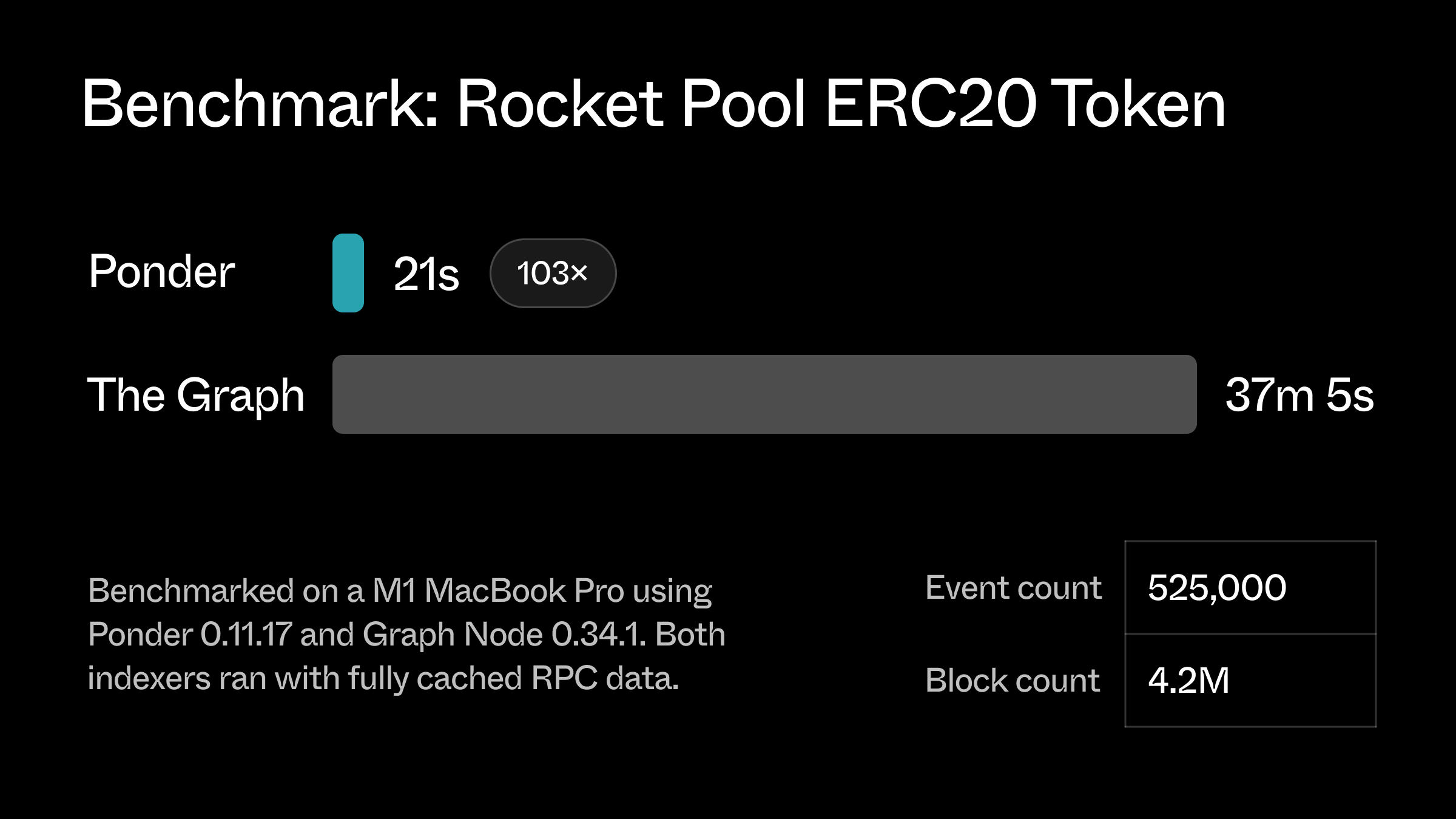 Performance is very important for a framework like Ponder, because it allows developers to rapidly and freely iterate, focusing on their business logic instead of restraints introduced by the tool. Over time, this creates faster feedback loops and better end user experiences.
We use end-to-end benchmarks, unit benchmarks, flamegraphs, and real-world user metrics to identify performance bottlenecks and measure the impact of our changes.
### Ponder's architecture
Ponder is essentially an [ETL framework](https://en.wikipedia.org/wiki/Extract,_transform,_load) – it **extracts** data from an Ethereum node through the JSON-RPC API, **transforms** the data with user-defined indexing functions, and **loads** the results into Postgres.
Internally, a Ponder app has two main phases. The **historical backfill** indexes events from the designated "start" of the app up to the current point in time. Then, the **realtime** phase indexes newly produced blocks, processing them immediately.
An “event” is a unit of onchain data that triggers an indexing function – blocks, transactions, logs, and traces can all be events depending on the project configuration. The simplified goal of our performance work is to increase the number of events processed per second across a diverse range of user workloads.
### Performance optimizations
We want to highlight three key performance optimizations from Ponder's **transform** step. The key bottlenecks in this step are 1) blocking database queries and 2) blocking RPC requests.
#### In-memory database
The transform step runs user-defined indexing functions, such as the one from our [ERC20 example](https://github.com/ponder-sh/ponder/blob/main/examples/reference-erc20/src/index.ts) below. Indexing functions typically make one or many database function calls to write application ready data to the database.
```ts [src/index.ts]
import { ponder } from "ponder:registry";
import { allowance, approvalEvent } from "ponder:schema";
ponder.on("ERC20:Approval", async ({ event, context }) => {
// upsert "allowance".
await context.db // [!code focus]
.insert(allowance) // [!code focus]
.values({ // [!code focus]
spender: event.args.spender, // [!code focus]
owner: event.args.owner, // [!code focus]
amount: event.args.amount, // [!code focus]
}) // [!code focus]
.onConflictDoUpdate({ amount: event.args.amount }); // [!code focus]
// add row to "approval_event".
await context.db.insert(approvalEvent).values({ // [!code focus]
id: event.id, // [!code focus]
amount: event.args.amount, // [!code focus]
timestamp: Number(event.block.timestamp), // [!code focus]
owner: event.args.owner, // [!code focus]
spender: event.args.spender, // [!code focus]
}); // [!code focus]
});
```
In early versions of Ponder, these store API methods – `find()`, `insert()`, `update()`, and `delete()` – each made one database query. This approach was simple and easy to maintain.
But – because Ponder processes events one-by-one – each database query blocks the entire indexing process. For systems with even a few milliseconds of latency between Ponder and the database, performance suffered.
In version 0.4.37, we introduced an in-memory buffer for database writes. With this design, the store API typically just adds a row to the in-memory cache, which is very fast. Behind the scenes, Ponder periodically flushes the buffer to the database in large batches using [COPY](https://www.postgresql.org/docs/current/sql-copy.html).
This optimization makes it practical to use Ponder despite database latencies up to \~100ms.
In certain cases, the in-memory buffer can also serve reads (e.g. `find` and `insert` with `onConflictDoUpdate`) which further reduces the frequency of blocking database queries.
```
│ Event │ Count │ Duration (ms) │
├────────────────┼───────┼───────────────┤
│ ERC20:Transfer │ 13332 │ 0.008 │
│ ERC20:Approval │ 4274 │ 0.005 │
```
The key trade-off with this design is higher memory usage, which requires careful management to avoid out-of-memory errors in large apps. More on that later.
:::info
The in-memory buffer uses a key-value storage model, which imposes some restrictions on table definitions. And if you use raw SQL, these optimizations don’t generally apply.
:::
#### Delayed errors
Let's take a deep dive into the `db.insert()` method.
This function throws an error if a row with the same primary key value already exists in the database (a unique constraint violation). To reliably throw this error, we have to query the database (and the in-memory buffer) to see if the target row is already there.
Unfortunately, this introduces a blocking database query for simple inserts (the most common database operation!). It’s especially bad when you consider that this query is almost always wasted work – only a tiny fraction of apps have logical errors that would cause a unique key constraint.
We released our solution in [0.9.20](https://github.com/ponder-sh/ponder/pull/1522). To avoid the blocking queries, we simply wait to detect & report the unique constraint error until the row gets flushed to the database. If we get an error, we have a mechanism to figure out exactly which indexing function was responsible, and we use that information to construct a useful error message.
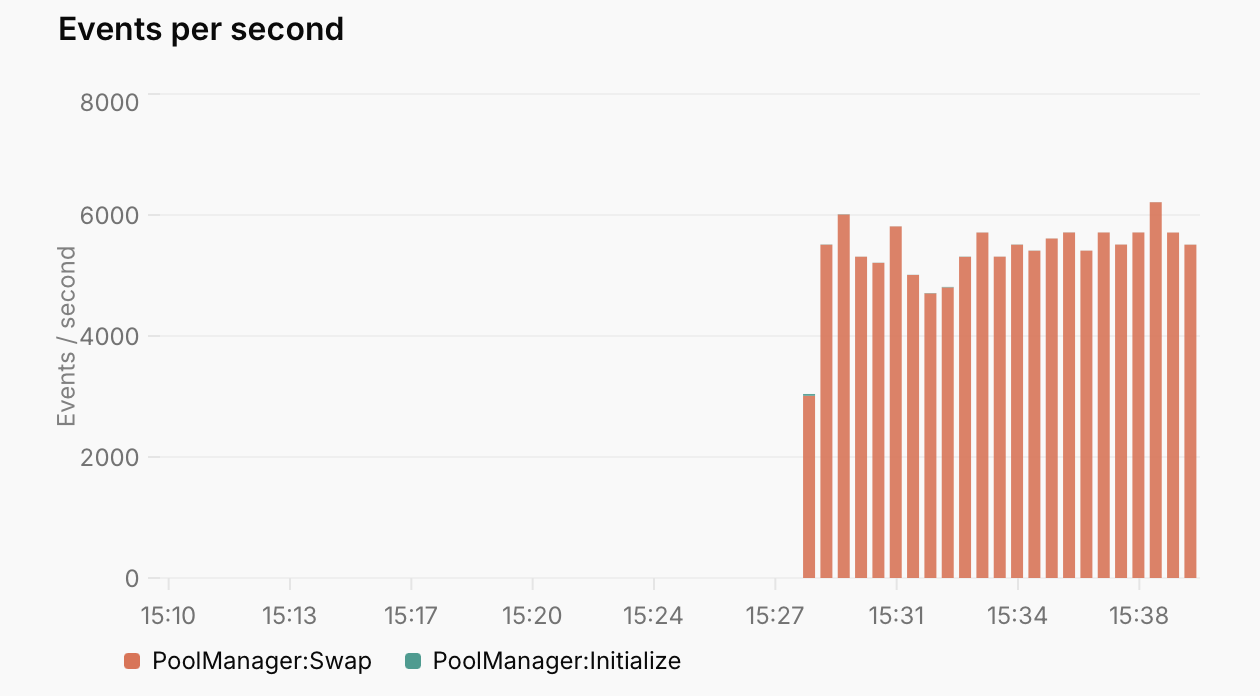
This optimization sped up our Uniswap V4 benchmark project by \~10x.
Performance is very important for a framework like Ponder, because it allows developers to rapidly and freely iterate, focusing on their business logic instead of restraints introduced by the tool. Over time, this creates faster feedback loops and better end user experiences.
We use end-to-end benchmarks, unit benchmarks, flamegraphs, and real-world user metrics to identify performance bottlenecks and measure the impact of our changes.
### Ponder's architecture
Ponder is essentially an [ETL framework](https://en.wikipedia.org/wiki/Extract,_transform,_load) – it **extracts** data from an Ethereum node through the JSON-RPC API, **transforms** the data with user-defined indexing functions, and **loads** the results into Postgres.
Internally, a Ponder app has two main phases. The **historical backfill** indexes events from the designated "start" of the app up to the current point in time. Then, the **realtime** phase indexes newly produced blocks, processing them immediately.
An “event” is a unit of onchain data that triggers an indexing function – blocks, transactions, logs, and traces can all be events depending on the project configuration. The simplified goal of our performance work is to increase the number of events processed per second across a diverse range of user workloads.
### Performance optimizations
We want to highlight three key performance optimizations from Ponder's **transform** step. The key bottlenecks in this step are 1) blocking database queries and 2) blocking RPC requests.
#### In-memory database
The transform step runs user-defined indexing functions, such as the one from our [ERC20 example](https://github.com/ponder-sh/ponder/blob/main/examples/reference-erc20/src/index.ts) below. Indexing functions typically make one or many database function calls to write application ready data to the database.
```ts [src/index.ts]
import { ponder } from "ponder:registry";
import { allowance, approvalEvent } from "ponder:schema";
ponder.on("ERC20:Approval", async ({ event, context }) => {
// upsert "allowance".
await context.db // [!code focus]
.insert(allowance) // [!code focus]
.values({ // [!code focus]
spender: event.args.spender, // [!code focus]
owner: event.args.owner, // [!code focus]
amount: event.args.amount, // [!code focus]
}) // [!code focus]
.onConflictDoUpdate({ amount: event.args.amount }); // [!code focus]
// add row to "approval_event".
await context.db.insert(approvalEvent).values({ // [!code focus]
id: event.id, // [!code focus]
amount: event.args.amount, // [!code focus]
timestamp: Number(event.block.timestamp), // [!code focus]
owner: event.args.owner, // [!code focus]
spender: event.args.spender, // [!code focus]
}); // [!code focus]
});
```
In early versions of Ponder, these store API methods – `find()`, `insert()`, `update()`, and `delete()` – each made one database query. This approach was simple and easy to maintain.
But – because Ponder processes events one-by-one – each database query blocks the entire indexing process. For systems with even a few milliseconds of latency between Ponder and the database, performance suffered.
In version 0.4.37, we introduced an in-memory buffer for database writes. With this design, the store API typically just adds a row to the in-memory cache, which is very fast. Behind the scenes, Ponder periodically flushes the buffer to the database in large batches using [COPY](https://www.postgresql.org/docs/current/sql-copy.html).
This optimization makes it practical to use Ponder despite database latencies up to \~100ms.
In certain cases, the in-memory buffer can also serve reads (e.g. `find` and `insert` with `onConflictDoUpdate`) which further reduces the frequency of blocking database queries.
```
│ Event │ Count │ Duration (ms) │
├────────────────┼───────┼───────────────┤
│ ERC20:Transfer │ 13332 │ 0.008 │
│ ERC20:Approval │ 4274 │ 0.005 │
```
The key trade-off with this design is higher memory usage, which requires careful management to avoid out-of-memory errors in large apps. More on that later.
:::info
The in-memory buffer uses a key-value storage model, which imposes some restrictions on table definitions. And if you use raw SQL, these optimizations don’t generally apply.
:::
#### Delayed errors
Let's take a deep dive into the `db.insert()` method.
This function throws an error if a row with the same primary key value already exists in the database (a unique constraint violation). To reliably throw this error, we have to query the database (and the in-memory buffer) to see if the target row is already there.
Unfortunately, this introduces a blocking database query for simple inserts (the most common database operation!). It’s especially bad when you consider that this query is almost always wasted work – only a tiny fraction of apps have logical errors that would cause a unique key constraint.
We released our solution in [0.9.20](https://github.com/ponder-sh/ponder/pull/1522). To avoid the blocking queries, we simply wait to detect & report the unique constraint error until the row gets flushed to the database. If we get an error, we have a mechanism to figure out exactly which indexing function was responsible, and we use that information to construct a useful error message.
This optimization sped up our Uniswap V4 benchmark project by \~10x.
 #### Speculation
What happens when the in-memory buffer gets too large? At first, we used a simple LRU algorithm to periodically evict rows from the cache that hadn’t been accessed in recent indexing functions. To our surprise, we saw very low cache hit rates with this approach. It turns out that recency is not a strong predictor for most indexing workloads.
Instead, we noticed that the best predictor for which database rows a specific indexing function would access is the event body itself. Ponder apps often use event properties like `block.timestamp`, `log.address`, and decoded log arguments as primary key values.
```ts [src/index.ts]
ponder.on(“ERC20:Transfer”, async ({ event, context }) => {
// Ponder profiles the database query and prefetches the result
const sender = context.db.find(accounts, { address: event.args.from });
});
```
This direction proved fruitful. Drawing inspiration from JavaScript engines, we designed a pre-fetching algorithm that works like this:
1. **Profile**: Continuously profile indexing function logic to record statistics about which database rows get accessed. The profiling data encodes concepts like: The `ERC20:Transfer` indexing function always runs a query where `account.address = event.args.from`.
2. **Predict**: For each new batch of events, use the profiling data to predict which database rows will be accessed while processing each event.
3. **Prefetch**: Send batch queries to the database to fetch all the predicted rows, and insert them into the in-memory cache.
The profiling step also handles compound primary keys and static/constant primary key values.
As a bonus, it turns out that the same approach works well to pre-fetch RPC requests made with `context.client`. If the profiling data indicates with >80% confidence that an indexing function will make a specific RPC request, Ponder kicks it off ahead of time.
```ts [src/index.ts]
ponder.on(“Erc20:Transfer”, async ({ event, context }) => {
// Ponder profiles the RPC request and prefetches the result
const data = await context.client.readContract({
abi: erc20Abi,
functionName: “balanceOf”,
address: event.log.address,
args: [event.args.from],
});
})
```
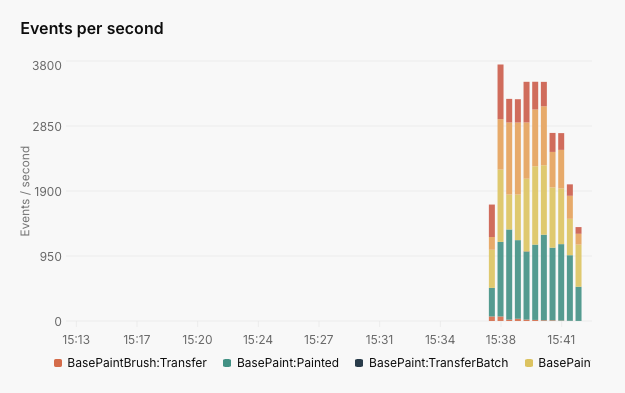
We released speculation in `0.10.8`, and it was a major performance win for most apps – our BasePaint example project got 6x faster.
#### Speculation
What happens when the in-memory buffer gets too large? At first, we used a simple LRU algorithm to periodically evict rows from the cache that hadn’t been accessed in recent indexing functions. To our surprise, we saw very low cache hit rates with this approach. It turns out that recency is not a strong predictor for most indexing workloads.
Instead, we noticed that the best predictor for which database rows a specific indexing function would access is the event body itself. Ponder apps often use event properties like `block.timestamp`, `log.address`, and decoded log arguments as primary key values.
```ts [src/index.ts]
ponder.on(“ERC20:Transfer”, async ({ event, context }) => {
// Ponder profiles the database query and prefetches the result
const sender = context.db.find(accounts, { address: event.args.from });
});
```
This direction proved fruitful. Drawing inspiration from JavaScript engines, we designed a pre-fetching algorithm that works like this:
1. **Profile**: Continuously profile indexing function logic to record statistics about which database rows get accessed. The profiling data encodes concepts like: The `ERC20:Transfer` indexing function always runs a query where `account.address = event.args.from`.
2. **Predict**: For each new batch of events, use the profiling data to predict which database rows will be accessed while processing each event.
3. **Prefetch**: Send batch queries to the database to fetch all the predicted rows, and insert them into the in-memory cache.
The profiling step also handles compound primary keys and static/constant primary key values.
As a bonus, it turns out that the same approach works well to pre-fetch RPC requests made with `context.client`. If the profiling data indicates with >80% confidence that an indexing function will make a specific RPC request, Ponder kicks it off ahead of time.
```ts [src/index.ts]
ponder.on(“Erc20:Transfer”, async ({ event, context }) => {
// Ponder profiles the RPC request and prefetches the result
const data = await context.client.readContract({
abi: erc20Abi,
functionName: “balanceOf”,
address: event.log.address,
args: [event.args.from],
});
})
```
We released speculation in `0.10.8`, and it was a major performance win for most apps – our BasePaint example project got 6x faster.
 ### What didn't work
It's also important to consider what didn't work and what can be learned from it. From versions 0.2 to 0.4, we implemented a static analysis feature to parse user code and extract the tables that each function reads and writes to. Ponder would use this information to run indexing functions out of order, sometimes multiple at a time.
While theoretically this would be faster than a single stream of events, it was very complex and fragile. We had many regressions and the dynamic, concurrent nature made it very difficult to debug. Luckily, we were able to take a step back and realize we were not getting the results that we wanted and ended up removing the feature entirely. The main takeaway from this is safe and simple fallback mechanisms are important when dealing with diverse and unknown user code.
### Future optimizations
We haven’t yet achieved our goal of 100,000 events per second. There are still many ways to make Ponder even faster. Some ideas are:
* **Multi-threading**: NodeJS is single-threaded. Today’s fastest apps – particularly where speculation is working well – are often bottlenecked by the CPU.
* **Better pipelining**: Each step of the ETL can be performed at the same time. Only the slowest step should be the overall bottleneck.
* **Column selection**: Most data (`block.logsBloom`, `transaction.input`) passed to indexing functions never gets used.
* **Node-API**: Computationally expensive functions such as `checksumAddress` can benefit from native code.
If any of these ideas excite you, please check out our [GitHub](https://github.com/ponder-sh/ponder) or reach out to [jobs@ponder.sh](mailto\:jobs@ponder.sh).
## Database \[Set up the database]
Ponder supports two database options, [**PGlite**](https://pglite.dev/) and Postgres.
* **PGlite**: An embedded Postgres database. PGlite runs in the same Node.js process as Ponder, and stores data in the `.ponder` directory. **Only suitable for local development**.
* **PostgreSQL**: A traditional Postgres database server. Required for production, can be used for local development.
### Choose a database
Ponder uses PGlite by default. To use Postgres, set the `DATABASE_URL` environment variable to a Postgres connection string, or use explicit configuration in `ponder.config.ts`.
```ts
import { createConfig } from "ponder";
export default createConfig({
database: { // [!code focus]
kind: "postgres", // [!code focus]
connectionString: "postgresql://user:password@localhost:5432/dbname", // [!code focus]
}, // [!code focus]
// ...
});
```
[Read more](/docs/api-reference/ponder/config#database) about database configuration in the `ponder.config.ts` API reference.
### Database schema
Ponder uses **database schemas** to organize data. Each instance must use a different schema.
Use the `DATABASE_SCHEMA` environment variable or `--schema` CLI option to configure the database schema for an instance. This is where the app will create the tables defined in `ponder.schema.ts`.
:::code-group
```bash [.env.local]
DATABASE_SCHEMA=my_schema
```
```bash [CLI]
ponder start --schema my_schema
```
:::
[Read more](/docs/production/self-hosting#database-schema) about database schema selection in the self-hosting guide.
#### Guidelines
Here are a few things to keep in mind when choosing a database schema.
* No two Ponder instances/deployments can use the same database schema at the same time.
* Tables created by `ponder start` are treated as valuable and will never be dropped automatically.
* The default schema for `ponder dev` is `public`. There is no default for `ponder start`, you must explicitly set the database schema.
* Use `ponder dev` for local development; `ponder start` is intended for production.
## Get started \[An introduction to Ponder]
### What is Ponder?
Ponder is an open-source TypeScript framework for EVM data indexing.
You write TypeScript code to transform onchain data into your application's schema. Then, Ponder fetches data from the chain, runs your indexing logic, and writes the result to Postgres.
Once indexed, you can query the data through GraphQL, SQL over HTTP, or directly in Postgres.
### Quickstart
::::steps
#### Run `create-ponder`
The quickest way to create a new Ponder project is `create-ponder`, which sets up everything automatically for you.
:::code-group
```bash [pnpm]
pnpm create ponder
```
```bash [yarn]
yarn create ponder
```
```bash [npm]
npm init ponder@latest
```
```bash [bun]
bun --bun create ponder
```
:::
On installation, you'll see a few prompts.
:::code-group
```ansi [Default]
✔ What's the name of your project? › new-project
✔ Which template would you like to use? › Default
✔ Installed packages with pnpm.
✔ Initialized git repository.
```
```ansi [ERC-20 example]
✔ What's the name of your project? › new-project
✔ Which template would you like to use? › Reference - ERC20 token
✔ Installed packages with pnpm.
✔ Initialized git repository.
```
:::
This guide follows the ERC-20 example, which indexes a token contract on Ethereum mainnet.
#### Start the dev server
After installation, start the local development server.
:::code-group
```bash [pnpm]
pnpm dev
```
```bash [yarn]
yarn dev
```
```bash [npm]
npm run dev
```
```bash [bun]
bun dev
```
:::
Ponder will connect to the database, start the HTTP server, and begin indexing.
:::code-group
```ansi [Logs]
12:16:42.845 INFO Connected to database type=postgres database=localhost:5432/demo (35ms)
12:16:42.934 INFO Connected to JSON-RPC chain=mainnet hostnames=["eth-mainnet.g.alchemy.com"] (85ms)
12:16:43.199 INFO Created database tables count=4 tables=["account","transfer_event","allowance","approval_event"] (17ms)
12:16:43.324 INFO Created HTTP server port=42069 (5ms)
12:16:43.325 INFO Started returning 200 responses endpoint=/health
12:16:43.553 INFO Started backfill indexing chain=mainnet block_range=[13142655,13150000]
12:16:43.555 INFO Started fetching backfill JSON-RPC data chain=mainnet cached_block=13145448 cache_rate=38.0%
12:16:43.796 INFO Indexed block range chain=mainnet event_count=4259 block_range=[13142655,13145448] (164ms)
12:16:43.840 INFO Indexed block range chain=mainnet event_count=33 block_range=[13145449,13145474] (4ms)
```
```ansi [Terminal UI]
Chains
│ Chain │ Status │ Block │ RPC (req/s) │
├─────────┼──────────┼──────────┼─────────────┤
│ mainnet │ backfill │ 13145260 │ 27.5 │
Indexing (backfill)
│ Event │ Count │ Duration (ms) │
├────────────────┼───────┼───────────────┤
│ ERC20:Transfer │ 3345 │ 0.015 │
│ ERC20:Approval │ 384 │ 0.011 │
████████████████░░░░░░░░░░░░░░░░░░░░░░░░░░░░░░░░ 35.1% (1m 22s eta)
API endpoints
Live at http://localhost:42069
```
:::
#### Query the database
Visit [localhost:42069/graphql](http://localhost:42069/graphql) in your browser to explore the auto-generated GraphQL API. Here's a query for the top accounts by balance, along with the total number of accounts.
:::code-group
```graphql [Query]
query {
accounts(orderBy: "balance", orderDirection: "desc", limit: 2) {
items {
address
balance
}
totalCount
}
}
```
```json [Result]
{
"accounts": {
"items": [
{ "address": "0x1234567890123456789012345678901234567890", "balance": "1000000000000000000" },
{ "address": "0x1234567890123456789012345678901234567891", "balance": "900000000000000000" },
],
"totalCount": 1726,
}
}
```
:::
:::tip
You can also query Ponder tables directly in Postgres, or write custom API endpoints. [Read more](/docs/query/direct-sql).
:::
#### Customize the schema
Let's add a new column to a table in `ponder.schema.ts`. We want to track which accounts are an owner of the token contract.
```ts [ponder.schema.ts]
import { index, onchainTable, primaryKey, relations } from "ponder";
export const account = onchainTable("account", (t) => ({
address: t.hex().primaryKey(),
balance: t.bigint().notNull(),
isOwner: t.boolean().notNull(), // [!code ++]
}));
// ...
```
Immediately, there's a type error in `src/index.ts` and a runtime error in the terminal. We added a required column, but our indexing logic doesn't include it.
```ansi [Terminal]
12:16:16 PM ERROR indexing Error while processing 'ERC20:Transfer' event
NotNullConstraintError: Column 'account.isOwner' violates not-null constraint.
at /workspace/new-project/src/index.ts:10:3
8 |
9 | ponder.on("ERC20:Transfer", async ({ event, context }) => {
> 10 | await context.db
| ^
11 | .insert(account)
12 | .values({ address: event.args.from, balance: 0n })
13 | .onConflictDoUpdate((row) => ({
```
#### Update indexing logic
Update the indexing logic to include `isOwner` when inserting new rows into the `account` table.
```ts [src/index.ts]
import { ponder } from "ponder:registry";
import { account } from "ponder:schema";
const OWNER_ADDRESS = "0x3bf93770f2d4a794c3d9ebefbaebae2a8f09a5e5"; // [!code ++]
ponder.on("ERC20:Transfer", async ({ event, context }) => {
await context.db
.insert(account)
.values({
address: event.args.from,
balance: 0n,
isOwner: event.args.from === OWNER_ADDRESS, // [!code ++]
})
.onConflictDoUpdate((row) => ({
// ...
})
```
As soon as we save the file, the dev server hot reloads and finishes indexing successfully.
:::code-group
```ansi [Logs]
12:19:31.629 INFO Hot reload "src/index.ts"
12:19:31.889 WARN Dropped existing database tables count=4 tables=["account","transfer_event","allowance","approval_event"] (3ms)
12:19:31.901 INFO Created database tables count=4 tables=["account","transfer_event","allowance","approval_event"] (12ms)
12:19:32.168 INFO Started backfill indexing chain=mainnet block_range=[13142655,13150000]
12:19:32.169 INFO Started fetching backfill JSON-RPC data chain=mainnet cached_block=13147325 cache_rate=63.6%
12:19:32.447 INFO Indexed block range chain=mainnet event_count=6004 block_range=[13142655,13146396] (199ms)
12:19:32.551 INFO Indexed block range chain=mainnet event_count=3607 block_range=[13146397,13147325] (104ms)
```
```ansi [Terminal UI]
Chains
│ Chain │ Status │ Block │ RPC (req/s) │
├─────────┼──────────┼──────────┼─────────────┤
│ mainnet │ backfill │ 13146425 │ 25.2 │
Indexing (backfill)
│ Event │ Count │ Duration (ms) │
├────────────────┼───────┼───────────────┤
│ ERC20:Transfer │ 5155 │ 0.014 │
│ ERC20:Approval │ 938 │ 0.010 │
████████████████████████░░░░░░░░░░░░░░░░░░░░░░░░ 51.5% (1m 07s eta)
API endpoints
Live at http://localhost:42069
```
:::
::::
### Next steps
This quickstart only scratches the surface of what Ponder can do. Take a look at the [examples directory](https://github.com/ponder-sh/ponder/tree/main/examples) for more complex projects, or the [GitHub dependents](https://github.com/ponder-sh/ponder/network/dependents?package_id=UGFja2FnZS0xMzA2OTEyMw%3D%3D) for a list of real-world repositories using Ponder.
Or, continue reading the guides and API reference here on the documentation site.
* [Contract configuration](/docs/config/contracts)
* [Query the database directly](/docs/query/direct-sql)
* [Schema design](/docs/schema/tables)
## Migration guide \[Upgrade to a new version of Ponder]
### 0.16
#### Breaking changes
##### Table and schema name length limits
The `onchainTable` name, `--schema` CLI option, and `--views-schema` CLI option now enforce a maximum length of 45 characters. This eliminates an issue where names could conflict undetected and cause undefined behavior.
Other values like column names, `onchainView` name, and index names are unaffected and will continue to use the default Postgres behavior (maximum of 63 characters with truncation).
##### Removed Etherscan and subgraph templates
The `create-ponder` CLI tool no longer supports bootstrapping a project from an Etherscan or subgraph link. Both options have been broken for some time due to breaking changes to upstream APIs.
#### New features
##### Bun support
Ponder now officially supports the [Bun](https://bun.sh) runtime. [Read more](/docs/guides/bun) in the new guide.
##### Live indexing performance improvement
During live indexing, the Store API now uses the same in-memory database as it uses during backfill indexing. This dramatically improves live indexing performance for high-throughput projects (\~50+ database operations per second). If your project was struggling to keep up with tip during live indexing, this release may solve your problem.
##### Full node-postgres `poolConfig` support
Ponder now supports the full range of [node-postgres](https://node-postgres.com/apis/pool) `poolConfig` options.
```ts [ponder.config.ts]
import { createConfig } from "ponder";
export default createConfig({
database: {
kind: "postgres",
poolConfig: {// [!code focus]
// ... config options // [!code focus]
}, // [!code focus]
},
});
```
### 0.15
#### Breaking changes
None.
#### New features
##### `ordering: "experimental_isolated"`
A new ordering mode, `experimental_isolated`, is available. This mode isolates each chain, requiring each table in the schema to include a `chain_id` column in the primary key. It also takes advantage of mulitple CPU cores for better performance.
Visit the [documentation](https://ponder.sh/docs/api-reference/ponder/config#ordering) for details.
##### Improved SQL over HTTP scalability
SQL over HTTP queries are cached and selectively invalidated only when a table referenced by the query is updated.
Live queries are now guaranteed to be updated *only when the query result changes*.
### 0.14
#### Breaking changes
##### Metrics updates
* Removed the `ponder_historical_duration`, `ponder_indexing_has_error`, and `ponder_http_server_port` metrics.
* Added a `chain` label to `ponder_historical_start_timestamp_seconds` and `ponder_historical_end_timestamp_seconds`.
* Updated histogram bucket limits.
#### New features
##### Log output improvements
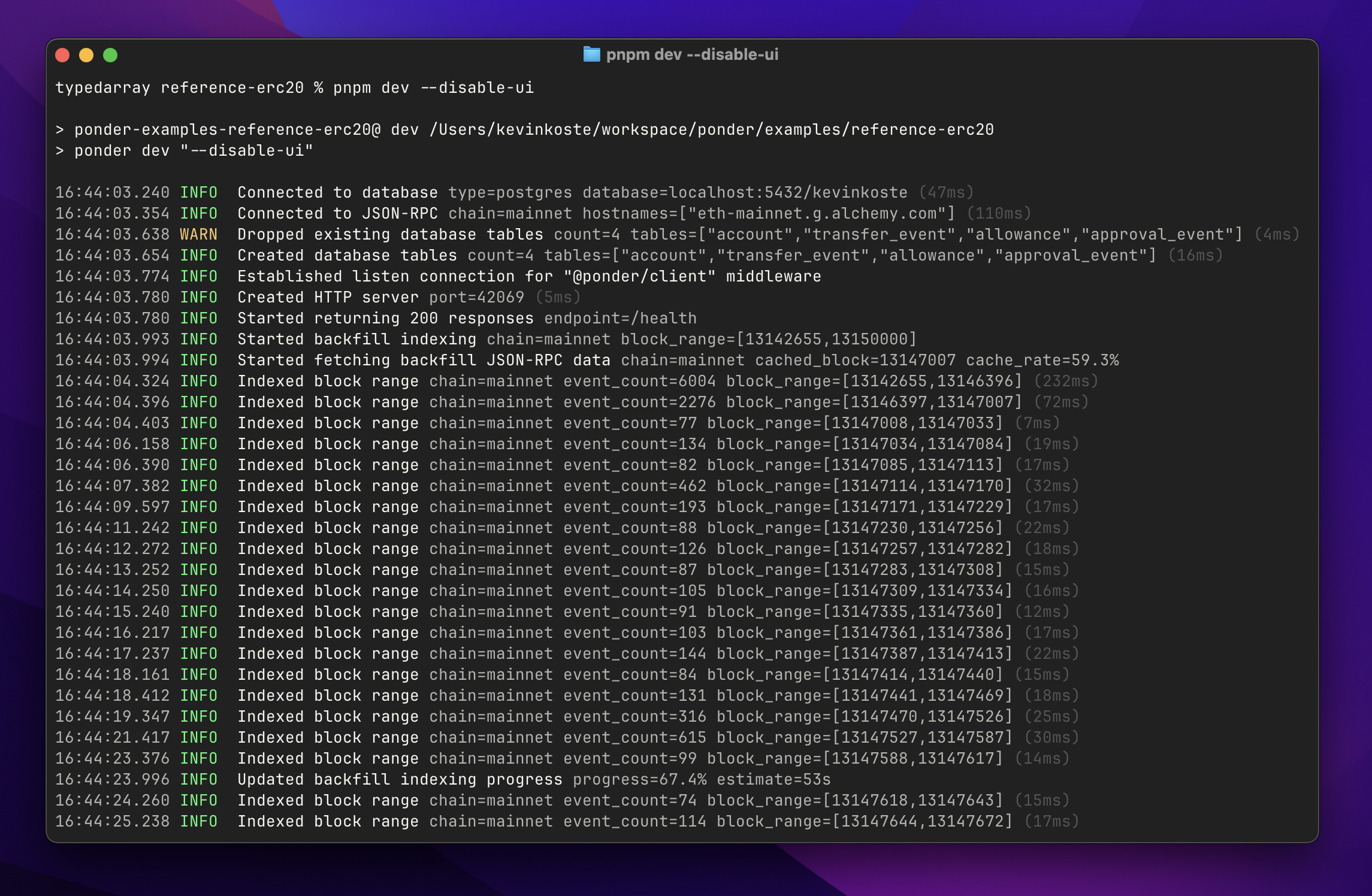
Ponder now emits a more useful set of logs. These changes improve signal-to-noise and aim to eliminate scenarios where Ponder appears to hang without printing any logs.
Highlights:
* Pretty logs (the default) now use millisecond precision for timestamps, no longer include a "service" column, and use [logfmt](https://brandur.org/logfmt) formatting for extra properties.
* JSON-formatted logs (`--log-format json` CLI option) now include a wider range of properties, e.g. `duration`, `block_range`, `chain_id`, and so on. The standard `service` property was removed.
##### GraphQL offset pagination
The GraphQL now supports `offset` pagination for each plural query field and `many()` relationship field.
[Read more](/docs/query/graphql#pagination) in the GraphQL pagination docs.
##### Custom database views
Ponder now supports custom database views in `ponder.schema.ts` that reference other tables or views in your schema. Custom views are defined using the Drizzle query builder API.
We expect this feature to be particularly useful for users who want custom query-time transformation logic but still prefer GraphQL (vs. SQL-over-HTTP or direct SQL).
[Read more](/docs/schema/views) in the custom view guide.
### 0.13
#### Breaking changes
None.
#### New features
##### Performance
Ponder now queries less data from the database when reindexing against a full RPC cache. This can eliminate a significant amount of unnecessary work for apps with a large number of events where the indexing logic only accesses a few properties on the `event` object.
### 0.12
#### Breaking changes
##### Lowercase addresses
Address values on the `event` object are now always **lowercase**. Before, these values were always checksum encoded.
This includes decoded event and trace arguments (e.g. `event.args.sender`) and these standard properties of the `event` object:
* `event.block.miner`
* `event.log.address`
* `event.transaction.to`
* `event.transaction.from`
* `event.transactionReceipt.from`
* `event.transactionReceipt.to`
* `event.transactionReceipt.contractAddress`
* `event.trace.from`
* `event.trace.to`
#### New features
##### Exit code 75
Ponder now exits with code 75 when the instance encounters a retryable error. This includes most RPC errors and database connection issues.
Exit code 1 now indicates a fatal error that is unlikely to resolve after a restart. This includes logical indexing errors (e.g. unique constraint violations).
### 0.11
#### Breaking changes
##### Renamed `networks` → `chains`
The `networks` field in `ponder.config.ts` was renamed and redesigned.
* `networks` → `chains`
* `chainId` → `id`
* `transport` → `rpc`
The new `rpc` field accepts one or more RPC endpoints directly, or a Viem Transport for backwards compatibility. When multiple RPC URLS are provided, Ponder load balances across them.
```ts [ponder.config.ts]
import { createConfig } from "ponder";
import { http } from "viem";
export default createConfig({
networks: { // [!code --]
mainnet: { // [!code --]
chainId: 1, // [!code --]
transport: http("https://eth-mainnet.g.alchemy.com/v2/your-api-key"), // [!code --]
}, // [!code --]
}, // [!code --]
chains: { // [!code ++]
mainnet: { // [!code ++]
id: 1, // [!code ++]
rpc: "https://eth-mainnet.g.alchemy.com/v2/your-api-key", // [!code ++]
}, // [!code ++]
}, // [!code ++]
contracts: {
Erc20: {
network: "mainnet", // [!code --]
chain: "mainnet", // [!code ++]
// ...
}
}
});
```
##### Renamed `context.network` → `context.chain`
The indexing function context object `context.network` was renamed to `context.chain`.
##### Renamed API functions → API endpoints
**API functions** were renamed to **API endpoints** throughout the documentation.
##### `publicClients` now keyed by chain name
The [`publicClients`](/docs/query/api-endpoints#rpc-requests) object (available in API endpoints) is now keyed by chain name, not chain ID.
##### `/status` response type
The response type for the `/status` endpoint and related functions from `@ponder/client` and `@ponder/react` has changed.
```ts
type Status = {
[chainName: string]: {
ready: boolean; // [!code --]
id: number; // [!code ++]
block: { number: number; timestamp: number };
};
};
```
##### Default `multichain` ordering
The default event ordering strategy was changed from `omnichain` to `multichain`. [Read more](/docs/api-reference/ponder/config#ordering) about event ordering.
#### New features
##### Database views pattern
This release introduces a new pattern for querying Ponder tables directly in Postgres. [Read more](/docs/production/self-hosting#views-pattern) about the views pattern.
:::steps
##### Update start command
To enable the views pattern on platforms like Railway, update the start command to include the new `--views-schema` flag.
```bash [Start command]
pnpm start --schema $RAILWAY_DEPLOYMENT_ID # [!code --]
pnpm start --schema $RAILWAY_DEPLOYMENT_ID --views-schema my_project # [!code ++]
```
Whenever a deployment becomes *ready* (historical indexing finishes), it will create views in the specified schema that "point" to its tables.
##### Query views schema
With this configuration, downstream applications can query the views schema directly. The views will always point at the latest deployment's tables.
```sql
SELECT * FROM my_project.accounts;
```
:::
### 0.10
#### Breaking changes
##### `ponder_sync` database migration
**WARNING**: This release includes an irreversible database migration to the RPC request cache located in the `ponder_sync` schema. Here are some details to consider when upgrading your production environment.
1. When an `0.10` instance starts up, it will attempt to run the migration against the connected database.
2. Any `<=0.9` instances currently connected to the database will crash, or the migration will fail.
3. Once the migration is complete, it's not possible to run `<=0.9` instances against the upgraded database.
##### Removed `event.log.id`
The `event.log.id` and `event.trace.id` properties were removed. Replace each occurrence with the new `event.id` property (described below), or update the table definition to use a compound primary key that better represents the business logic / domain.
```ts [src/index.ts]
import { ponder } from "ponder:registry";
import { transferEvent } from "ponder:registry";
ponder.on("ERC20:Transfer", ({ event, context }) => {
await context.db
.insert(transferEvent)
.values({ id: event.log.id }); // [!code --]
.values({ id: event.id }); // [!code ++]
});
```
##### Removed `event.name`
The undocumented `event.name` property was also removed.
#### New features
##### `event.id`
The new `event.id` property is a globally unique identifier for a log, block, transaction, or trace event that works across any number of chains. Each `event.id` value is a 75-digit positive integer represented as a string.
##### Factory performance
This release fixes a long-standing performance issue affecting large factory contracts (10k+ addresses). Before, a SQL query was used to dynamically generate the list of addresses for each batch of events. This did not scale well. Now, the list of addresses is materialized directly and all address filtering occurs in-memory.
##### RPC request cache fixes
This release fixes two performance issues related to the ad-hoc RPC request cache.
1. **Reorg reconciliation** — Before, the query that evicted non-canonical results from the cache did not have an appropriate index. This occasionally caused timeouts leading to a crash.
2. **Large multicalls** — Before, multicall requests were treated naively as a single large `eth_call`. Now, the caching logic intelligently splits large multicall requests into smaller chunks.
### 0.9
#### Breaking changes
##### API endpoints file is required
The Hono / API endpoints file `src/api/index.ts` is now required. The GraphQL API is no longer served by default.
To achieve the same functionality as `<=0.8`, copy the following code into `src/api/index.ts`.
```ts [src/api/index.ts]
import { db } from "ponder:api";
import schema from "ponder:schema";
import { Hono } from "hono";
import { graphql } from "ponder";
const app = new Hono();
app.use("/", graphql({ db, schema }));
app.use("/graphql", graphql({ db, schema }));
export default app;
```
##### Removed `ponder.get()`, `post()`, `use()`
This release makes custom API endpoints less opinionated. Just default export a normal Hono `App` object from the `src/api/index.ts` file, and Ponder will serve it.
The `ponder.get()`, `post()`, `use()` methods were removed. Now, use Hono's built-in routing system.
:::code-group
```ts [src/api/index.ts (0.8 and below)]
import { ponder } from "ponder:registry";
ponder.get("/hello", (c) => {
return c.text("Hello, world!");
});
```
```ts [src/api/index.ts (0.9)]
import { Hono } from "hono";
const app = new Hono();
app.get("/hello", (c) => {
return c.text("Hello, world!");
});
export default app;
```
:::
##### Removed `c.db`
The `c.db` object was removed from the Hono context. Now, use the `"ponder:api"` virtual module to access the readonly Drizzle database object.
```ts [src/api/index.ts]
import { db } from "ponder:api"; // [!code focus]
import schema from "ponder:schema";
import { Hono } from "hono";
const app = new Hono();
app.get("/account/:address", async (c) => {
const address = c.req.param("address");
const account = await db // [!code focus]
.select() // [!code focus]
.from(schema.accounts) // [!code focus]
.where(eq(schema.accounts.address, address)) // [!code focus]
.limit(1); // [!code focus]
return c.json(account);
});
export default app;
```
#### New features
##### SQL over HTTP
The `@ponder/client` package provides a new experience for querying a Ponder app over HTTP. It's an SQL-based alternative to the GraphQL API. [Read more](/docs/query/sql-over-http).
##### `@ponder/react`
The `@ponder/react` package uses `@ponder/client` and Tanstack Query to provide reactive live queries. [Read more](/docs/query/sql-over-http#guide-react).
##### `publicClients`
Custom API endpoint files now have access to a new `"ponder:api"` virtual module. This module contains the `db` object and a new `publicClients` object, which contains a Viem [Public Client](https://viem.sh/docs/clients/public) for each network. These clients use the transports defined in `ponder.config.ts`.
```ts [src/api/index.ts] {1,11}
import { publicClients, db } from "ponder:api"; // [!code focus]
import schema from "ponder:schema";
import { Hono } from "hono";
const app = new Hono();
app.get("/account/:chainId/:address", async (c) => {
const chainId = c.req.param("chainId");
const address = c.req.param("address");
const balance = await publicClients[chainId].getBalance({ address }); // [!code focus]
const account = await db.query.accounts.findFirst({
where: eq(schema.accounts.address, address),
});
return c.json({ balance, account });
});
export default app;
```
##### Custom log filters
The `contracts.filter` property now supports multiple log filters, and requires argument values. [Read more](/docs/config/contracts#filter).
### 0.8
#### Breaking changes
:::warning
This release includes an irreversible migration to the `ponder_sync` schema (RPC request cache). Once you run a `0.8` app against a database, you can no longer run `<=0.7` apps against the same database.
:::
##### Database management
Ponder now requires the database schema to be explicitly specified with an environment variable or CLI flag. **`onchainSchema()` is removed.**
```bash [.env.local]
DATABASE_SCHEMA=my_schema
```
```bash [shell]
ponder start --schema my_schema
```
:::info
Each deployment/instance of a Ponder app must have it's own schema, with some exceptions for `ponder dev` and crash recovery. [Read more](/docs/database#database-schema).
:::
##### Railway
Railway users should [update the start command](/docs/production/railway#create-a-ponder-app-service) to include a database schema.
:::code-group
```bash [pnpm]
pnpm start --schema $RAILWAY_DEPLOYMENT_ID
```
```bash [yarn]
yarn start --schema $RAILWAY_DEPLOYMENT_ID
```
```bash [npm]
npm run start -- --schema $RAILWAY_DEPLOYMENT_ID
```
```bash [bun]
bun start -- --schema $RAILWAY_DEPLOYMENT_ID
```
:::
##### `@ponder/core` → `ponder`
New versions will be published to `ponder` and not `@ponder/core`.
:::code-group
```bash [pnpm]
pnpm remove @ponder/core
pnpm add ponder
```
```bash [yarn]
yarn remove @ponder/core
yarn add ponder
```
```bash [npm]
npm remove @ponder/core
npm add ponder
```
```bash [bun]
bun remove @ponder/core
bun add ponder
```
:::
##### `@/generated` → `ponder:registry`
The virtual module `@/generated` was replaced with `ponder:registry`.
```diff [src/index.ts]
- import { ponder } from "@/generated";
+ import { ponder } from "ponder:registry";
```
##### `factory()` function
The `factory()` function replaces the `factory` property in the contract config. The result should be passed to the `address` property.
:::code-group
```ts [ponder.config.ts (0.7 and below)]
import { createConfig } from "@ponder/core";
export default createConfig({
contracts: {
uniswap: {
factory: { // [!code focus]
address: "0x1F98431c8aD98523631AE4a59f267346ea31F984", // [!code focus]
event: getAbiItem({ abi: UniswapV3FactoryAbi, name: "PoolCreated" }), // [!code focus]
parameter: "pool", // [!code focus]
}, // [!code focus]
},
},
});
```
```ts [ponder.config.ts (0.8)]
import { createConfig, factory } from "ponder"; // [!code focus]
export default createConfig({
contracts: {
uniswap: {
address: factory({ // [!code focus]
address: "0x1F98431c8aD98523631AE4a59f267346ea31F984", // [!code focus]
event: getAbiItem({ abi: UniswapV3FactoryAbi, name: "PoolCreated" }), // [!code focus]
parameter: "pool", // [!code focus]
}), // [!code focus]
},
},
});
```
:::
##### `ponder-env.d.ts`
This release updates the `ponder-env.d.ts` file. The new file uses [triple slash directives](https://www.typescriptlang.org/docs/handbook/triple-slash-directives.html#-reference-types-) for less frequent updates.
:::code-group
```bash [pnpm]
pnpm codegen
```
```bash [yarn]
yarn codegen
```
```bash [npm]
npm run codegen
```
```bash [bun]
bun codegen
```
:::
##### Removed `transactionReceipt.logs`
The `transactionReceipt.logs` property was removed from the `event` object.
##### Removed redundant properties from `event`
The following properties were removed from the `event` object.
```diff
- event.log.blockNumber;
- event.log.blockHash;
- event.log.transactionHash;
- event.log.transactionIndex;
- event.transaction.blockNumber;
- event.transaction.blockHash;
- event.transactionReceipt.transactionHash;
- event.transactionReceipt.transactionIndex;
```
All of the data is still available on other properties of the `event` object, such as `event.transaction.hash` or `event.block.number`.
#### New features
##### Account indexing
A new event source `accounts` is available. Accounts can be used to index transactions and native transfers to and from an address. [Read more](/docs/config/accounts).
##### `ponder:schema` alias
The `ponder:schema` virtual module was added. It is an alias for `ponder.schema.ts`.
```diff [src/index.ts]
- import { accounts } from "../ponder.schema";
+ import { accounts } from "ponder:schema";
```
It also contains a default export of all the exported table objects from `ponder.schema.ts`.
```ts [src/index.ts] {1,3}
import schema from "ponder:schema";
const row = await db.insert(schema.accounts).values({
address: "0x7Df1", balance: 0n
});
```
##### `ponder db list`
A new command was added for more visibility into which database schemas are being used.
```bash [shell]
$ ponder db list
│ Schema │ Active │ Last active │ Table count │
├───────────────┼──────────┼────────────────┼─────────────┤
│ indexer_prod │ yes │ --- │ 10 │
│ test │ no │ 26m 58s ago │ 10 │
│ demo │ no │ 1 day ago │ 5 │
```
### 0.7
#### Breaking changes
This release includes several breaking changes.
::::steps
##### Install & run codegen
:::code-group
```bash [pnpm]
pnpm add @ponder/core@0.7
```
```bash [yarn]
yarn add @ponder/core@0.7
```
```bash [npm]
npm add @ponder/core@0.7
```
```bash [bun]
bun add @ponder/core@0.7
```
:::
To ensure strong type safety during the migration, regenerate `ponder-env.d.ts`.
:::code-group
```bash [pnpm]
pnpm codegen
```
```bash [yarn]
yarn codegen
```
```bash [npm]
npm run codegen
```
```bash [bun]
bun codegen
```
:::
##### Migrate `ponder.schema.ts`
Here's a table defined with the new schema definition API, which uses [Drizzle](https://orm.drizzle.team/docs/overview) under the hood.
```ts [ponder.schema.ts (after)]
import { onchainTable } from "@ponder/core";
export const accounts = onchainTable("account", (t) => ({
address: t.hex().primaryKey(),
daiBalance: t.bigint().notNull(),
isAdmin: t.boolean().notNull(),
graffiti: t.text(),
}));
```
Key changes:
1. Declare tables with the `onchainTable` function exported from `@ponder/core`
2. Export all table objects from `ponder.schema.ts`
3. Use `.primaryKey()` to mark the primary key column
4. Columns are nullable by default, use `.notNull()` to add the constraint
5. The `hex` column type now uses `TEXT` instead of `BYTEA`
6. `p.float()` (`DOUBLE PRECISION`) was removed, use `t.doublePrecision()` or `t.real()` instead
The new `onchainTable` function adds several new capabilities.
* Custom primary key column name (other than `id`)
* Composite primary keys
* Default column values
Here's a more advanced example with indexes and a composite primary key.
```ts [ponder.schema.ts]
import { onchainTable, index, primaryKey } from "@ponder/core";
export const transferEvents = onchainTable(
"transfer_event",
(t) => ({
id: t.text().primaryKey(),
amount: t.bigint().notNull(),
timestamp: t.integer().notNull(),
from: t.hex().notNull(),
to: t.hex().notNull(),
}),
(table) => ({
fromIdx: index().on(table.from),
})
);
export const allowance = onchainTable(
"allowance",
(t) => ({
owner: t.hex().notNull(),
spender: t.hex().notNull(),
amount: t.bigint().notNull(),
}),
(table) => ({
pk: primaryKey({ columns: [table.owner, table.spender] }),
})
);
export const approvalEvent = onchainTable("approval_event", (t) => ({
id: t.text().primaryKey(),
amount: t.bigint().notNull(),
timestamp: t.integer().notNull(),
owner: t.hex().notNull(),
spender: t.hex().notNull(),
}));
```
##### Migrate indexing functions
This release updates the indexing function database API to offer a unified SQL experience based on Drizzle.
Here's an indexing function defined with the new API, which uses the table objects exported from `ponder.schema.ts`.
```ts [src/index.ts]
import { ponder } from "@/generated";
import { account } from "../ponder.schema";
ponder.on("ERC20:Transfer", async ({ event, context }) => {
await context.db
.insert(account)
.values({
address: event.args.from,
balance: 0n,
isOwner: false,
})
.onConflictDoUpdate((row) => ({
balance: row.balance - event.args.amount,
}));
});
```
Key changes:
1. Transition from ORM pattern `db.Account.create({ ... }){:ts}` to query builder pattern `db.insert(accounts, { ... }){:ts}`
2. Import table objects from `ponder.schema.ts`
3. Replace `findMany` with `db.sql.select(...)` or `db.sql.query(...)`
Here is a simple migration example to familiarize yourself with the API.
:::code-group
```ts [src/index.ts (0.6 and below)]
// Create a single allowance
await context.db.Allowance.create({
id: event.log.id,
data: {
owner: event.args.owner,
spender: event.args.spender,
amount: event.args.amount,
},
});
```
```ts [src/index.ts (0.7)]
import { allowance } from "../ponder.schema";
// Create a single allowance
await context.db
.insert(allowance)
.values({
id: event.log.id,
owner: event.args.owner,
spender: event.args.spender,
amount: event.args.amount,
});
```
:::
Here is a reference for how to migrate each method.
```ts [src/index.ts]
// create -> insert
await context.db.Account.create({
id: event.args.from,
data: { balance: 0n },
});
await context.db.insert(account).values({ id: event.args.from, balance: 0n });
// createMany -> insert
await context.db.Account.createMany({
data: [
{ id: event.args.from, balance: 0n },
{ id: event.args.to, balance: 0n },
],
});
await context.db.insert(account).values([
{ id: event.args.from, balance: 0n },
{ id: event.args.to, balance: 0n },
]);
// findUnique -> find
await context.db.Account.findUnique({ id: event.args.from });
await context.db.find(account, { address: event.args.from });
// update
await context.db.Account.update({
id: event.args.from,
data: ({ current }) => ({ balance: current.balance + 100n }),
});
await context.db
.update(account, { address: event.args.from })
.set((row) => ({ balance: row.balance + 100n }));
// upsert
await context.db.Account.upsert({
id: event.args.from,
create: { balance: 0n },
update: ({ current }) => ({ balance: current.balance + 100n }),
});
await context.db
.insert(account)
.values({ address: event.args.from, balance: 0n })
.onConflictDoUpdate((row) => ({ balance: row.balance + 100n }));
// delete
await context.db.Account.delete({ id: event.args.from });
await context.db.delete(account, { address: event.args.from });
// findMany -> raw SQL select, see below
await context.db.Account.findMany({ where: { balance: { gt: 100n } } });
await context.db.sql.select().from(account).where(eq(account.balance, 100n));
// updateMany -> raw SQL update, see below
await context.db.Player.updateMany({
where: { id: { startsWith: "J" } },
data: { age: 50 },
});
await context.db.sql
.update(player)
.set({ age: 50 })
.where(like(player.id, "J%"));
```
Finally, another migration example for an ERC20 Transfer indexing function using `upsert`.
:::code-group
```ts [src/index.ts (0.6 and below)]
import { ponder } from "@/generated";
ponder.on("ERC20:Transfer", async ({ event, context }) => {
const { Account, TransferEvent } = context.db;
await Account.upsert({
id: event.args.from,
create: {
balance: BigInt(0),
isOwner: false,
},
update: ({ current }) => ({
balance: current.balance - event.args.amount,
}),
});
});
```
```ts [src/index.ts (0.7)]
import { ponder } from "@/generated";
import { account } from "../ponder.schema";
ponder.on("ERC20:Transfer", async ({ event, context }) => {
await context.db
.insert(account)
.values({
address: event.args.from,
balance: 0n,
isOwner: false,
})
.onConflictDoUpdate((row) => ({
balance: row.balance - event.args.amount,
}));
});
```
:::
##### Migrate API functions
* Removed `c.tables` in favor of importing table objects from `ponder.schema.ts`
::::
#### New features
##### Arbitrary SQL within indexing functions
The new `context.db.sql` interface replaces the rigid `findMany` method and supports any valid SQL `select` query.
```ts [src/index.ts]
import { desc } from "@ponder/core";
import { account } from "../ponder.schema";
ponder.on("...", ({ event, context }) => {
const result = await context.db.sql
.select()
.from(account)
.orderBy(desc(account.balance))
.limit(1);
});
```
### 0.6.0
#### Breaking changes
##### Updated `viem` to `>=2`
This release updates the `viem` peer dependency requirement to `>=2`. The `context.client` action `getBytecode` was renamed to `getCode`.
:::code-group
```bash [pnpm]
pnpm add viem@latest
```
```bash [yarn]
yarn add viem@latest
```
```bash [npm]
npm install viem@latest
```
```bash [bun]
bun add viem@latest
```
:::
##### Simplified Postgres schema pattern
Starting with this release, the indexed tables, reorg tables, and metadata table for a Ponder app are contained in one Postgres schema, specified by the user in `ponder.config.ts` (defaults to `public`). This means the shared `ponder` schema is no longer used. (Note: The `ponder_sync` schema is still in use).
This release also removes the view publishing pattern and the `publishSchema` option from `ponder.config.ts`, which may disrupt production setups using horizontal scaling or direct SQL. If you relied on the publish pattern, please [get in touch on Telegram](https://t.me/kevinkoste) and we'll work to get you unblocked.
#### New features
##### Added `/ready`, updated `/health`
The new `/ready` endpoint returns an HTTP `200` response once the app **is ready to serve requests**. This means that historical indexing is complete and the app is indexing events in realtime.
The existing `/health` endpoint now returns an HTTP `200` response as soon as the process starts. (This release removes the `maxHealthcheckDuration` option, which previously governed the behavior of `/health`.)
For Railway users, we now recommend using `/ready` as the health check endpoint to enable zero downtime deployments. If your app takes a while to sync, be sure to set the healthcheck timeout accordingly. Read the [Railway deployment guide](/docs/production/railway#create-a-ponder-app-service) for more details.
### 0.5.0
#### Breaking changes
##### `hono` peer dependency
This release adds [Hono](https://hono.dev) as a peer dependency. After upgrading, install `hono` in your project.
:::code-group
```bash [pnpm]
pnpm add hono@latest
```
```bash [yarn]
yarn add hono@latest
```
```bash [npm]
npm install hono@latest
```
```bash [bun]
bun add hono@latest
```
:::
#### New features
##### Introduced custom API endpoints
This release added support for API functions. [Read more](/docs/query/api-endpoints).
### 0.4.0
#### Breaking changes
This release changes the location of database tables when using both SQLite and Postgres. It **does not** require any changes to your application code, and does not bust the sync cache for SQLite or Postgres.
##### New database layout
Please read the new docs on [direct SQL](/docs/query/direct-sql) for a detailed overview.
**SQLite**
Ponder now uses the `.ponder/sqlite/public.db` file for indexed tables. Before, the tables were present as views in the `.ponder/sqlite/ponder.db`. Now, the`.ponder/sqlite/ponder.db` file is only used internally by Ponder.
**Postgres**
Ponder now creates a table in the `public` schema for each table in `ponder.schema.ts`. Before, Ponder created them as views in the `ponder` schema.
Isolation while running multiple Ponder instances against the same database also works differently. Before, Ponder used a schema with a pseudorandom name if the desired schema was in use. Now, Ponder will fail on startup with an error if it cannot acquire a lock on the desired schema.
This also changes the zero-downtime behavior on platforms like Railway. For more information on how this works in `0.4`, please reference:
* [Direct SQL](/docs/query/direct-sql)
* [Zero-downtime deployments](/docs/production/self-hosting#database-schema)
**Postgres table cleanup**
After upgrading to `0.4`, you can run the following Postgres SQL script to clean up stale tables and views created by `0.3` Ponder apps.
**Note:** This script could obviously be destructive, so please read it carefully before executing.
```sql [cleanup.sql]
DO $$
DECLARE
view_name TEXT;
schema_name_var TEXT;
BEGIN
-- Drop all views from the 'ponder' schema
FOR view_name IN SELECT table_name FROM information_schema.views WHERE table_schema = 'ponder'
LOOP
EXECUTE format('DROP VIEW IF EXISTS ponder.%I CASCADE', view_name);
RAISE NOTICE 'Dropped view "ponder"."%"', view_name;
END LOOP;
-- Drop the 'ponder_cache' schema
EXECUTE 'DROP SCHEMA IF EXISTS ponder_cache CASCADE';
RAISE NOTICE 'Dropped schema "ponder_cache"';
-- Find and drop any 'ponder_instance_*' schemas
FOR schema_name_var IN SELECT schema_name AS schema_name_alias FROM information_schema.schemata WHERE schema_name LIKE 'ponder_instance_%'
LOOP
EXECUTE format('DROP SCHEMA IF EXISTS %I CASCADE', schema_name_var);
RAISE NOTICE 'Dropped schema "%"', schema_name_var;
END LOOP;
END $$;
```
### 0.3.0
#### Breaking changes
##### Moved SQLite directory
**Note:** This release busted the SQLite sync cache.
The SQLite database was moved from the `.ponder/store` directory to `.ponder/sqlite`. The old `.ponder/store` directory will still be used by older versions.
##### Moved Postgres sync tables
Similar to SQLite, the sync tables for Postgres were moved from the `public` schema to `ponder_sync`. Now, Ponder does not use the `public` schema whatsoever.
This change did NOT bust the sync cache; the tables were actually moved. This process emits some `WARN`-level logs that you should see after upgrading.
### 0.2.0
#### Breaking changes
##### Replaced `p.bytes()` with `p.hex()`
Removed `p.bytes()` in favor of a new `p.hex()` primitive column type. `p.hex()` is suitable for Ethereum addresses and other hex-encoded data, including EVM `bytes` types. `p.hex()` values are stored as `bytea` (Postgres) or `blob` (SQLite). To migrate, replace each occurrence of `p.bytes()` in `ponder.schema.ts` with `p.hex()`, and ensure that any values you pass into hex columns are valid hexadecimal strings. The GraphQL API returns `p.hex()` values as hexadecimal strings, and allows sorting/filtering on `p.hex()` columns using the numeric comparison operators (`gt`, `gte`, `le`, `lte`).
#### New features
##### Cursor pagination
Updated the GraphQL API to use cursor pagination instead of offset pagination. Note that this change also affects the `findMany` database method. See the [GraphQL pagination docs](/docs/query/graphql#pagination) for more details.
### 0.1
#### Breaking changes
##### Config
* In general, `ponder.config.ts` now has much more static validation using TypeScript. This includes network names in `contracts`, ABI event names for the contract `event` and `factory` options, and more.
* The `networks` and `contracts` fields were changed from an array to an object. The network or contract name is now specified using an object property name. The `name` field for both networks and contracts was removed.
* The `filter` field has been removed. To index all events matching a specific signature across all contract addresses, add a contract that specifies the `event` field without specifying an `address`.
* The `abi` field now requires an ABI object that has been asserted as const (cannot use a file path). See the ABIType documentation for more details.
##### Schema
* The schema definition API was rebuilt from scratch to use a TypeScript file `ponder.schema.ts` instead of `schema.graphql`. The `ponder.schema.ts` file has static validation using TypeScript.
* Note that it is possible to convert a `schema.graphql` file into a `ponder.schema.ts` file without introducing any breaking changes to the autogenerated GraphQL API schema.
* Please see the `design your schema` guide for an overview of the new API.
##### Indexing functions
* `event.params` was renamed to `event.args` to better match Ethereum terminology norms.
* If a contract uses the `event` option, only the specified events will be available for registration. Before, all events in the ABI were available.
* `context.models` was renamed to `context.db`
* Now, a read-only Viem client is available at `context.client`. This client uses the same transport you specify in `ponder.config.ts`, except all method are cached to speed up subsequent indexing.
* The `context.contracts` object now contains the contract addresses and ABIs specified in`ponder.config.ts`, typed as strictly as possible. (You should not need to copy addresses and ABIs around anymore, just use `context.contracts`).
* A new `context.network` object was added which contains the network name and chain ID that the current event is from.
##### Multi-chain indexing
* The contract `network` field `ponder.config.ts` was upgraded to support an object of network-specific overrides. This is a much better DX for indexing the same contract on multiple chains.
* The options that you can specify per-network are `address`, `event`, `startBlock`, `endBlock`, and `factory`.
* When you add a contract on multiple networks, Ponder will sync the contract on each network you specify. Any indexing functions you register for the contract will now process events across all networks.
* The `context.network` object is typed according to the networks that the current contract runs on, so you can write network-specific logic like `if (context.network.name === "optimism") { …`
##### Vite
* Ponder now uses Vite to transform and load your code. This means you can import files from outside the project root directory.
* Vite's module graph makes it possible to invalidate project files granularly, only reloading the specific parts of your app that need to be updated when a specific file changes. For example, if you save a change to one of your ABI files, `ponder.config.ts` will reload because it imports that file, but your schema will not reload.
* This update also unblocks a path towards concurrent indexing and granular caching of indexing function results.
## Requirements \[Get Ponder running on your machine]
The `create-ponder` CLI is the easiest way to [get started](/docs/get-started) with Ponder. If it runs without error, your system likely meets the requirements.
### System requirements
* macOS, Linux, or Windows (including WSL).
* [Node.js](https://nodejs.org/en) 18.18 or later.
* [PostgreSQL](https://www.postgresql.org/download/) version 14, 15, 16 or 17.
### TypeScript
Ponder uses advanced TypeScript features to offer end-to-end type safety without code generation. We **strongly** recommend taking the time to set up a working TypeScript development environment – it will pay dividends in the long run.
#### Requirements
* TypeScript `>=5.0.4`, viem `>=2`, and hono `>=4.5`
* ABIs must be asserted `as const` following [ABIType guidelines](https://abitype.dev/guide/getting-started#usage)
* The `ponder-env.d.ts` file must be present and up to date
#### `ponder-env.d.ts`
This file powers Ponder's zero-codegen type system. It contains a declaration for the `ponder:registry` virtual module which exports types derived from `ponder.config.ts` and `ponder.schema.ts`.
After upgrading to a new version of `ponder`, the dev server might make changes to `ponder-env.d.ts`. When this happens, please accept and commit the changes.
#### VSCode
By default, VSCode's TypeScript language features use an internal version of TypeScript. Sometimes, this version does not meet Ponder's requirement of `>=5.0.4`.
To change VSCode's TypeScript version, run `TypeScript: Select TypeScript version..."` from the command palette and select `Use Workspace Version` or [update VSCode's version](https://stackoverflow.com/questions/39668731/what-typescript-version-is-visual-studio-code-using-how-to-update-it).
import { Benchmarks } from "../../components/benchmarks";
## Why Ponder \[Notes on why we built Ponder]
**Ponder is an open-source framework for custom Ethereum indexing.**
With Ponder, you can rapidly build & deploy an API that serves custom data from smart contracts on any EVM blockchain.
### Most apps need a backend
Many developers have quietly accepted that you need traditional backend web services to build great crypto apps – particularly for indexing.
The standard RPC, subgraphs, and out-of-the-box API endpoints are great for getting started, but fall short as applications mature and new requirements appear. When this happens, developers often roll their own web backend, which gives them the flexibility to write custom server-side code.
Unfortunately, engineering teams across the industry reinvent the wheel on common problems (reorgs, RPC error handling, etc) in closed-source repositories where best practices remain siloed.
We built Ponder because **this is a framework-shaped problem**.
### Local development
It’s so hard to run a subgraph locally that devs often deploy to the hosted service just to run their code. This creates long feedback loops and errors that are painful to debug.
Ponder is designed from the ground up for local development. The dev server has hot reloading for every file in your project and descriptive error logs that keep you unblocked.
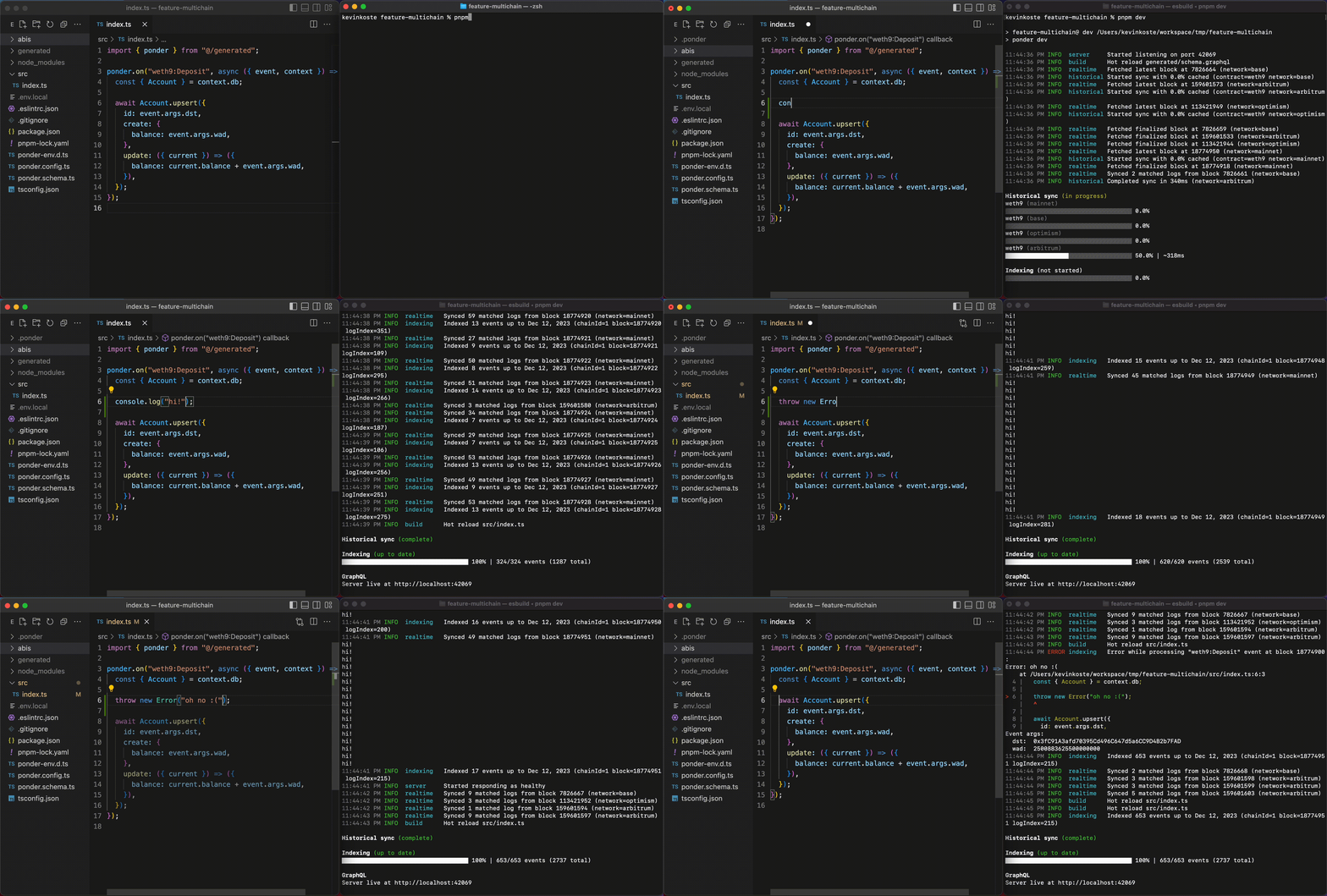
Ponder’s type safety and editor autocomplete is very thorough, and works without any codegen or build step. If your code passes the type checker, it will usually run without error.
### Focus on web developers
Ponder is built for web & mobile application developers. If you understand the basics of Ethereum and can write some TypeScript, you’ll be productive with Ponder in a matter of minutes. (So, data analysts, protocol developers, and researchers can use Ponder too.)
Your code runs in a JavaScript runtime (Node.js) where you can import NPM packages, make HTTP requests, and connect to databases. This makes it easy to do things that are painful in constrained environments like WebAssembly sandboxes, SQL engines, and EVM runtimes.
### Performance
Long feedback loops are the kiss of death for developer productivity, and unfortunately they're commonplace in blockchain indexing tools.
Ponder is fast and lean. In our initial benchmarks, Ponder indexed an ERC20 contract \~10x faster than the Graph Node from a cold start and 15x faster fully cached.
### What didn't work
It's also important to consider what didn't work and what can be learned from it. From versions 0.2 to 0.4, we implemented a static analysis feature to parse user code and extract the tables that each function reads and writes to. Ponder would use this information to run indexing functions out of order, sometimes multiple at a time.
While theoretically this would be faster than a single stream of events, it was very complex and fragile. We had many regressions and the dynamic, concurrent nature made it very difficult to debug. Luckily, we were able to take a step back and realize we were not getting the results that we wanted and ended up removing the feature entirely. The main takeaway from this is safe and simple fallback mechanisms are important when dealing with diverse and unknown user code.
### Future optimizations
We haven’t yet achieved our goal of 100,000 events per second. There are still many ways to make Ponder even faster. Some ideas are:
* **Multi-threading**: NodeJS is single-threaded. Today’s fastest apps – particularly where speculation is working well – are often bottlenecked by the CPU.
* **Better pipelining**: Each step of the ETL can be performed at the same time. Only the slowest step should be the overall bottleneck.
* **Column selection**: Most data (`block.logsBloom`, `transaction.input`) passed to indexing functions never gets used.
* **Node-API**: Computationally expensive functions such as `checksumAddress` can benefit from native code.
If any of these ideas excite you, please check out our [GitHub](https://github.com/ponder-sh/ponder) or reach out to [jobs@ponder.sh](mailto\:jobs@ponder.sh).
## Database \[Set up the database]
Ponder supports two database options, [**PGlite**](https://pglite.dev/) and Postgres.
* **PGlite**: An embedded Postgres database. PGlite runs in the same Node.js process as Ponder, and stores data in the `.ponder` directory. **Only suitable for local development**.
* **PostgreSQL**: A traditional Postgres database server. Required for production, can be used for local development.
### Choose a database
Ponder uses PGlite by default. To use Postgres, set the `DATABASE_URL` environment variable to a Postgres connection string, or use explicit configuration in `ponder.config.ts`.
```ts
import { createConfig } from "ponder";
export default createConfig({
database: { // [!code focus]
kind: "postgres", // [!code focus]
connectionString: "postgresql://user:password@localhost:5432/dbname", // [!code focus]
}, // [!code focus]
// ...
});
```
[Read more](/docs/api-reference/ponder/config#database) about database configuration in the `ponder.config.ts` API reference.
### Database schema
Ponder uses **database schemas** to organize data. Each instance must use a different schema.
Use the `DATABASE_SCHEMA` environment variable or `--schema` CLI option to configure the database schema for an instance. This is where the app will create the tables defined in `ponder.schema.ts`.
:::code-group
```bash [.env.local]
DATABASE_SCHEMA=my_schema
```
```bash [CLI]
ponder start --schema my_schema
```
:::
[Read more](/docs/production/self-hosting#database-schema) about database schema selection in the self-hosting guide.
#### Guidelines
Here are a few things to keep in mind when choosing a database schema.
* No two Ponder instances/deployments can use the same database schema at the same time.
* Tables created by `ponder start` are treated as valuable and will never be dropped automatically.
* The default schema for `ponder dev` is `public`. There is no default for `ponder start`, you must explicitly set the database schema.
* Use `ponder dev` for local development; `ponder start` is intended for production.
## Get started \[An introduction to Ponder]
### What is Ponder?
Ponder is an open-source TypeScript framework for EVM data indexing.
You write TypeScript code to transform onchain data into your application's schema. Then, Ponder fetches data from the chain, runs your indexing logic, and writes the result to Postgres.
Once indexed, you can query the data through GraphQL, SQL over HTTP, or directly in Postgres.
### Quickstart
::::steps
#### Run `create-ponder`
The quickest way to create a new Ponder project is `create-ponder`, which sets up everything automatically for you.
:::code-group
```bash [pnpm]
pnpm create ponder
```
```bash [yarn]
yarn create ponder
```
```bash [npm]
npm init ponder@latest
```
```bash [bun]
bun --bun create ponder
```
:::
On installation, you'll see a few prompts.
:::code-group
```ansi [Default]
✔ What's the name of your project? › new-project
✔ Which template would you like to use? › Default
✔ Installed packages with pnpm.
✔ Initialized git repository.
```
```ansi [ERC-20 example]
✔ What's the name of your project? › new-project
✔ Which template would you like to use? › Reference - ERC20 token
✔ Installed packages with pnpm.
✔ Initialized git repository.
```
:::
This guide follows the ERC-20 example, which indexes a token contract on Ethereum mainnet.
#### Start the dev server
After installation, start the local development server.
:::code-group
```bash [pnpm]
pnpm dev
```
```bash [yarn]
yarn dev
```
```bash [npm]
npm run dev
```
```bash [bun]
bun dev
```
:::
Ponder will connect to the database, start the HTTP server, and begin indexing.
:::code-group
```ansi [Logs]
12:16:42.845 INFO Connected to database type=postgres database=localhost:5432/demo (35ms)
12:16:42.934 INFO Connected to JSON-RPC chain=mainnet hostnames=["eth-mainnet.g.alchemy.com"] (85ms)
12:16:43.199 INFO Created database tables count=4 tables=["account","transfer_event","allowance","approval_event"] (17ms)
12:16:43.324 INFO Created HTTP server port=42069 (5ms)
12:16:43.325 INFO Started returning 200 responses endpoint=/health
12:16:43.553 INFO Started backfill indexing chain=mainnet block_range=[13142655,13150000]
12:16:43.555 INFO Started fetching backfill JSON-RPC data chain=mainnet cached_block=13145448 cache_rate=38.0%
12:16:43.796 INFO Indexed block range chain=mainnet event_count=4259 block_range=[13142655,13145448] (164ms)
12:16:43.840 INFO Indexed block range chain=mainnet event_count=33 block_range=[13145449,13145474] (4ms)
```
```ansi [Terminal UI]
Chains
│ Chain │ Status │ Block │ RPC (req/s) │
├─────────┼──────────┼──────────┼─────────────┤
│ mainnet │ backfill │ 13145260 │ 27.5 │
Indexing (backfill)
│ Event │ Count │ Duration (ms) │
├────────────────┼───────┼───────────────┤
│ ERC20:Transfer │ 3345 │ 0.015 │
│ ERC20:Approval │ 384 │ 0.011 │
████████████████░░░░░░░░░░░░░░░░░░░░░░░░░░░░░░░░ 35.1% (1m 22s eta)
API endpoints
Live at http://localhost:42069
```
:::
#### Query the database
Visit [localhost:42069/graphql](http://localhost:42069/graphql) in your browser to explore the auto-generated GraphQL API. Here's a query for the top accounts by balance, along with the total number of accounts.
:::code-group
```graphql [Query]
query {
accounts(orderBy: "balance", orderDirection: "desc", limit: 2) {
items {
address
balance
}
totalCount
}
}
```
```json [Result]
{
"accounts": {
"items": [
{ "address": "0x1234567890123456789012345678901234567890", "balance": "1000000000000000000" },
{ "address": "0x1234567890123456789012345678901234567891", "balance": "900000000000000000" },
],
"totalCount": 1726,
}
}
```
:::
:::tip
You can also query Ponder tables directly in Postgres, or write custom API endpoints. [Read more](/docs/query/direct-sql).
:::
#### Customize the schema
Let's add a new column to a table in `ponder.schema.ts`. We want to track which accounts are an owner of the token contract.
```ts [ponder.schema.ts]
import { index, onchainTable, primaryKey, relations } from "ponder";
export const account = onchainTable("account", (t) => ({
address: t.hex().primaryKey(),
balance: t.bigint().notNull(),
isOwner: t.boolean().notNull(), // [!code ++]
}));
// ...
```
Immediately, there's a type error in `src/index.ts` and a runtime error in the terminal. We added a required column, but our indexing logic doesn't include it.
```ansi [Terminal]
12:16:16 PM ERROR indexing Error while processing 'ERC20:Transfer' event
NotNullConstraintError: Column 'account.isOwner' violates not-null constraint.
at /workspace/new-project/src/index.ts:10:3
8 |
9 | ponder.on("ERC20:Transfer", async ({ event, context }) => {
> 10 | await context.db
| ^
11 | .insert(account)
12 | .values({ address: event.args.from, balance: 0n })
13 | .onConflictDoUpdate((row) => ({
```
#### Update indexing logic
Update the indexing logic to include `isOwner` when inserting new rows into the `account` table.
```ts [src/index.ts]
import { ponder } from "ponder:registry";
import { account } from "ponder:schema";
const OWNER_ADDRESS = "0x3bf93770f2d4a794c3d9ebefbaebae2a8f09a5e5"; // [!code ++]
ponder.on("ERC20:Transfer", async ({ event, context }) => {
await context.db
.insert(account)
.values({
address: event.args.from,
balance: 0n,
isOwner: event.args.from === OWNER_ADDRESS, // [!code ++]
})
.onConflictDoUpdate((row) => ({
// ...
})
```
As soon as we save the file, the dev server hot reloads and finishes indexing successfully.
:::code-group
```ansi [Logs]
12:19:31.629 INFO Hot reload "src/index.ts"
12:19:31.889 WARN Dropped existing database tables count=4 tables=["account","transfer_event","allowance","approval_event"] (3ms)
12:19:31.901 INFO Created database tables count=4 tables=["account","transfer_event","allowance","approval_event"] (12ms)
12:19:32.168 INFO Started backfill indexing chain=mainnet block_range=[13142655,13150000]
12:19:32.169 INFO Started fetching backfill JSON-RPC data chain=mainnet cached_block=13147325 cache_rate=63.6%
12:19:32.447 INFO Indexed block range chain=mainnet event_count=6004 block_range=[13142655,13146396] (199ms)
12:19:32.551 INFO Indexed block range chain=mainnet event_count=3607 block_range=[13146397,13147325] (104ms)
```
```ansi [Terminal UI]
Chains
│ Chain │ Status │ Block │ RPC (req/s) │
├─────────┼──────────┼──────────┼─────────────┤
│ mainnet │ backfill │ 13146425 │ 25.2 │
Indexing (backfill)
│ Event │ Count │ Duration (ms) │
├────────────────┼───────┼───────────────┤
│ ERC20:Transfer │ 5155 │ 0.014 │
│ ERC20:Approval │ 938 │ 0.010 │
████████████████████████░░░░░░░░░░░░░░░░░░░░░░░░ 51.5% (1m 07s eta)
API endpoints
Live at http://localhost:42069
```
:::
::::
### Next steps
This quickstart only scratches the surface of what Ponder can do. Take a look at the [examples directory](https://github.com/ponder-sh/ponder/tree/main/examples) for more complex projects, or the [GitHub dependents](https://github.com/ponder-sh/ponder/network/dependents?package_id=UGFja2FnZS0xMzA2OTEyMw%3D%3D) for a list of real-world repositories using Ponder.
Or, continue reading the guides and API reference here on the documentation site.
* [Contract configuration](/docs/config/contracts)
* [Query the database directly](/docs/query/direct-sql)
* [Schema design](/docs/schema/tables)
## Migration guide \[Upgrade to a new version of Ponder]
### 0.16
#### Breaking changes
##### Table and schema name length limits
The `onchainTable` name, `--schema` CLI option, and `--views-schema` CLI option now enforce a maximum length of 45 characters. This eliminates an issue where names could conflict undetected and cause undefined behavior.
Other values like column names, `onchainView` name, and index names are unaffected and will continue to use the default Postgres behavior (maximum of 63 characters with truncation).
##### Removed Etherscan and subgraph templates
The `create-ponder` CLI tool no longer supports bootstrapping a project from an Etherscan or subgraph link. Both options have been broken for some time due to breaking changes to upstream APIs.
#### New features
##### Bun support
Ponder now officially supports the [Bun](https://bun.sh) runtime. [Read more](/docs/guides/bun) in the new guide.
##### Live indexing performance improvement
During live indexing, the Store API now uses the same in-memory database as it uses during backfill indexing. This dramatically improves live indexing performance for high-throughput projects (\~50+ database operations per second). If your project was struggling to keep up with tip during live indexing, this release may solve your problem.
##### Full node-postgres `poolConfig` support
Ponder now supports the full range of [node-postgres](https://node-postgres.com/apis/pool) `poolConfig` options.
```ts [ponder.config.ts]
import { createConfig } from "ponder";
export default createConfig({
database: {
kind: "postgres",
poolConfig: {// [!code focus]
// ... config options // [!code focus]
}, // [!code focus]
},
});
```
### 0.15
#### Breaking changes
None.
#### New features
##### `ordering: "experimental_isolated"`
A new ordering mode, `experimental_isolated`, is available. This mode isolates each chain, requiring each table in the schema to include a `chain_id` column in the primary key. It also takes advantage of mulitple CPU cores for better performance.
Visit the [documentation](https://ponder.sh/docs/api-reference/ponder/config#ordering) for details.
##### Improved SQL over HTTP scalability
SQL over HTTP queries are cached and selectively invalidated only when a table referenced by the query is updated.
Live queries are now guaranteed to be updated *only when the query result changes*.
### 0.14
#### Breaking changes
##### Metrics updates
* Removed the `ponder_historical_duration`, `ponder_indexing_has_error`, and `ponder_http_server_port` metrics.
* Added a `chain` label to `ponder_historical_start_timestamp_seconds` and `ponder_historical_end_timestamp_seconds`.
* Updated histogram bucket limits.
#### New features
##### Log output improvements
Ponder now emits a more useful set of logs. These changes improve signal-to-noise and aim to eliminate scenarios where Ponder appears to hang without printing any logs.
Highlights:
* Pretty logs (the default) now use millisecond precision for timestamps, no longer include a "service" column, and use [logfmt](https://brandur.org/logfmt) formatting for extra properties.
* JSON-formatted logs (`--log-format json` CLI option) now include a wider range of properties, e.g. `duration`, `block_range`, `chain_id`, and so on. The standard `service` property was removed.

##### GraphQL offset pagination
The GraphQL now supports `offset` pagination for each plural query field and `many()` relationship field.
[Read more](/docs/query/graphql#pagination) in the GraphQL pagination docs.
##### Custom database views
Ponder now supports custom database views in `ponder.schema.ts` that reference other tables or views in your schema. Custom views are defined using the Drizzle query builder API.
We expect this feature to be particularly useful for users who want custom query-time transformation logic but still prefer GraphQL (vs. SQL-over-HTTP or direct SQL).
[Read more](/docs/schema/views) in the custom view guide.
### 0.13
#### Breaking changes
None.
#### New features
##### Performance
Ponder now queries less data from the database when reindexing against a full RPC cache. This can eliminate a significant amount of unnecessary work for apps with a large number of events where the indexing logic only accesses a few properties on the `event` object.
### 0.12
#### Breaking changes
##### Lowercase addresses
Address values on the `event` object are now always **lowercase**. Before, these values were always checksum encoded.
This includes decoded event and trace arguments (e.g. `event.args.sender`) and these standard properties of the `event` object:
* `event.block.miner`
* `event.log.address`
* `event.transaction.to`
* `event.transaction.from`
* `event.transactionReceipt.from`
* `event.transactionReceipt.to`
* `event.transactionReceipt.contractAddress`
* `event.trace.from`
* `event.trace.to`
#### New features
##### Exit code 75
Ponder now exits with code 75 when the instance encounters a retryable error. This includes most RPC errors and database connection issues.
Exit code 1 now indicates a fatal error that is unlikely to resolve after a restart. This includes logical indexing errors (e.g. unique constraint violations).
### 0.11
#### Breaking changes
##### Renamed `networks` → `chains`
The `networks` field in `ponder.config.ts` was renamed and redesigned.
* `networks` → `chains`
* `chainId` → `id`
* `transport` → `rpc`
The new `rpc` field accepts one or more RPC endpoints directly, or a Viem Transport for backwards compatibility. When multiple RPC URLS are provided, Ponder load balances across them.
```ts [ponder.config.ts]
import { createConfig } from "ponder";
import { http } from "viem";
export default createConfig({
networks: { // [!code --]
mainnet: { // [!code --]
chainId: 1, // [!code --]
transport: http("https://eth-mainnet.g.alchemy.com/v2/your-api-key"), // [!code --]
}, // [!code --]
}, // [!code --]
chains: { // [!code ++]
mainnet: { // [!code ++]
id: 1, // [!code ++]
rpc: "https://eth-mainnet.g.alchemy.com/v2/your-api-key", // [!code ++]
}, // [!code ++]
}, // [!code ++]
contracts: {
Erc20: {
network: "mainnet", // [!code --]
chain: "mainnet", // [!code ++]
// ...
}
}
});
```
##### Renamed `context.network` → `context.chain`
The indexing function context object `context.network` was renamed to `context.chain`.
##### Renamed API functions → API endpoints
**API functions** were renamed to **API endpoints** throughout the documentation.
##### `publicClients` now keyed by chain name
The [`publicClients`](/docs/query/api-endpoints#rpc-requests) object (available in API endpoints) is now keyed by chain name, not chain ID.
##### `/status` response type
The response type for the `/status` endpoint and related functions from `@ponder/client` and `@ponder/react` has changed.
```ts
type Status = {
[chainName: string]: {
ready: boolean; // [!code --]
id: number; // [!code ++]
block: { number: number; timestamp: number };
};
};
```
##### Default `multichain` ordering
The default event ordering strategy was changed from `omnichain` to `multichain`. [Read more](/docs/api-reference/ponder/config#ordering) about event ordering.
#### New features
##### Database views pattern
This release introduces a new pattern for querying Ponder tables directly in Postgres. [Read more](/docs/production/self-hosting#views-pattern) about the views pattern.
:::steps
##### Update start command
To enable the views pattern on platforms like Railway, update the start command to include the new `--views-schema` flag.
```bash [Start command]
pnpm start --schema $RAILWAY_DEPLOYMENT_ID # [!code --]
pnpm start --schema $RAILWAY_DEPLOYMENT_ID --views-schema my_project # [!code ++]
```
Whenever a deployment becomes *ready* (historical indexing finishes), it will create views in the specified schema that "point" to its tables.
##### Query views schema
With this configuration, downstream applications can query the views schema directly. The views will always point at the latest deployment's tables.
```sql
SELECT * FROM my_project.accounts;
```
:::
### 0.10
#### Breaking changes
##### `ponder_sync` database migration
**WARNING**: This release includes an irreversible database migration to the RPC request cache located in the `ponder_sync` schema. Here are some details to consider when upgrading your production environment.
1. When an `0.10` instance starts up, it will attempt to run the migration against the connected database.
2. Any `<=0.9` instances currently connected to the database will crash, or the migration will fail.
3. Once the migration is complete, it's not possible to run `<=0.9` instances against the upgraded database.
##### Removed `event.log.id`
The `event.log.id` and `event.trace.id` properties were removed. Replace each occurrence with the new `event.id` property (described below), or update the table definition to use a compound primary key that better represents the business logic / domain.
```ts [src/index.ts]
import { ponder } from "ponder:registry";
import { transferEvent } from "ponder:registry";
ponder.on("ERC20:Transfer", ({ event, context }) => {
await context.db
.insert(transferEvent)
.values({ id: event.log.id }); // [!code --]
.values({ id: event.id }); // [!code ++]
});
```
##### Removed `event.name`
The undocumented `event.name` property was also removed.
#### New features
##### `event.id`
The new `event.id` property is a globally unique identifier for a log, block, transaction, or trace event that works across any number of chains. Each `event.id` value is a 75-digit positive integer represented as a string.
##### Factory performance
This release fixes a long-standing performance issue affecting large factory contracts (10k+ addresses). Before, a SQL query was used to dynamically generate the list of addresses for each batch of events. This did not scale well. Now, the list of addresses is materialized directly and all address filtering occurs in-memory.
##### RPC request cache fixes
This release fixes two performance issues related to the ad-hoc RPC request cache.
1. **Reorg reconciliation** — Before, the query that evicted non-canonical results from the cache did not have an appropriate index. This occasionally caused timeouts leading to a crash.
2. **Large multicalls** — Before, multicall requests were treated naively as a single large `eth_call`. Now, the caching logic intelligently splits large multicall requests into smaller chunks.
### 0.9
#### Breaking changes
##### API endpoints file is required
The Hono / API endpoints file `src/api/index.ts` is now required. The GraphQL API is no longer served by default.
To achieve the same functionality as `<=0.8`, copy the following code into `src/api/index.ts`.
```ts [src/api/index.ts]
import { db } from "ponder:api";
import schema from "ponder:schema";
import { Hono } from "hono";
import { graphql } from "ponder";
const app = new Hono();
app.use("/", graphql({ db, schema }));
app.use("/graphql", graphql({ db, schema }));
export default app;
```
##### Removed `ponder.get()`, `post()`, `use()`
This release makes custom API endpoints less opinionated. Just default export a normal Hono `App` object from the `src/api/index.ts` file, and Ponder will serve it.
The `ponder.get()`, `post()`, `use()` methods were removed. Now, use Hono's built-in routing system.
:::code-group
```ts [src/api/index.ts (0.8 and below)]
import { ponder } from "ponder:registry";
ponder.get("/hello", (c) => {
return c.text("Hello, world!");
});
```
```ts [src/api/index.ts (0.9)]
import { Hono } from "hono";
const app = new Hono();
app.get("/hello", (c) => {
return c.text("Hello, world!");
});
export default app;
```
:::
##### Removed `c.db`
The `c.db` object was removed from the Hono context. Now, use the `"ponder:api"` virtual module to access the readonly Drizzle database object.
```ts [src/api/index.ts]
import { db } from "ponder:api"; // [!code focus]
import schema from "ponder:schema";
import { Hono } from "hono";
const app = new Hono();
app.get("/account/:address", async (c) => {
const address = c.req.param("address");
const account = await db // [!code focus]
.select() // [!code focus]
.from(schema.accounts) // [!code focus]
.where(eq(schema.accounts.address, address)) // [!code focus]
.limit(1); // [!code focus]
return c.json(account);
});
export default app;
```
#### New features
##### SQL over HTTP
The `@ponder/client` package provides a new experience for querying a Ponder app over HTTP. It's an SQL-based alternative to the GraphQL API. [Read more](/docs/query/sql-over-http).
##### `@ponder/react`
The `@ponder/react` package uses `@ponder/client` and Tanstack Query to provide reactive live queries. [Read more](/docs/query/sql-over-http#guide-react).
##### `publicClients`
Custom API endpoint files now have access to a new `"ponder:api"` virtual module. This module contains the `db` object and a new `publicClients` object, which contains a Viem [Public Client](https://viem.sh/docs/clients/public) for each network. These clients use the transports defined in `ponder.config.ts`.
```ts [src/api/index.ts] {1,11}
import { publicClients, db } from "ponder:api"; // [!code focus]
import schema from "ponder:schema";
import { Hono } from "hono";
const app = new Hono();
app.get("/account/:chainId/:address", async (c) => {
const chainId = c.req.param("chainId");
const address = c.req.param("address");
const balance = await publicClients[chainId].getBalance({ address }); // [!code focus]
const account = await db.query.accounts.findFirst({
where: eq(schema.accounts.address, address),
});
return c.json({ balance, account });
});
export default app;
```
##### Custom log filters
The `contracts.filter` property now supports multiple log filters, and requires argument values. [Read more](/docs/config/contracts#filter).
### 0.8
#### Breaking changes
:::warning
This release includes an irreversible migration to the `ponder_sync` schema (RPC request cache). Once you run a `0.8` app against a database, you can no longer run `<=0.7` apps against the same database.
:::
##### Database management
Ponder now requires the database schema to be explicitly specified with an environment variable or CLI flag. **`onchainSchema()` is removed.**
```bash [.env.local]
DATABASE_SCHEMA=my_schema
```
```bash [shell]
ponder start --schema my_schema
```
:::info
Each deployment/instance of a Ponder app must have it's own schema, with some exceptions for `ponder dev` and crash recovery. [Read more](/docs/database#database-schema).
:::
##### Railway
Railway users should [update the start command](/docs/production/railway#create-a-ponder-app-service) to include a database schema.
:::code-group
```bash [pnpm]
pnpm start --schema $RAILWAY_DEPLOYMENT_ID
```
```bash [yarn]
yarn start --schema $RAILWAY_DEPLOYMENT_ID
```
```bash [npm]
npm run start -- --schema $RAILWAY_DEPLOYMENT_ID
```
```bash [bun]
bun start -- --schema $RAILWAY_DEPLOYMENT_ID
```
:::
##### `@ponder/core` → `ponder`
New versions will be published to `ponder` and not `@ponder/core`.
:::code-group
```bash [pnpm]
pnpm remove @ponder/core
pnpm add ponder
```
```bash [yarn]
yarn remove @ponder/core
yarn add ponder
```
```bash [npm]
npm remove @ponder/core
npm add ponder
```
```bash [bun]
bun remove @ponder/core
bun add ponder
```
:::
##### `@/generated` → `ponder:registry`
The virtual module `@/generated` was replaced with `ponder:registry`.
```diff [src/index.ts]
- import { ponder } from "@/generated";
+ import { ponder } from "ponder:registry";
```
##### `factory()` function
The `factory()` function replaces the `factory` property in the contract config. The result should be passed to the `address` property.
:::code-group
```ts [ponder.config.ts (0.7 and below)]
import { createConfig } from "@ponder/core";
export default createConfig({
contracts: {
uniswap: {
factory: { // [!code focus]
address: "0x1F98431c8aD98523631AE4a59f267346ea31F984", // [!code focus]
event: getAbiItem({ abi: UniswapV3FactoryAbi, name: "PoolCreated" }), // [!code focus]
parameter: "pool", // [!code focus]
}, // [!code focus]
},
},
});
```
```ts [ponder.config.ts (0.8)]
import { createConfig, factory } from "ponder"; // [!code focus]
export default createConfig({
contracts: {
uniswap: {
address: factory({ // [!code focus]
address: "0x1F98431c8aD98523631AE4a59f267346ea31F984", // [!code focus]
event: getAbiItem({ abi: UniswapV3FactoryAbi, name: "PoolCreated" }), // [!code focus]
parameter: "pool", // [!code focus]
}), // [!code focus]
},
},
});
```
:::
##### `ponder-env.d.ts`
This release updates the `ponder-env.d.ts` file. The new file uses [triple slash directives](https://www.typescriptlang.org/docs/handbook/triple-slash-directives.html#-reference-types-) for less frequent updates.
:::code-group
```bash [pnpm]
pnpm codegen
```
```bash [yarn]
yarn codegen
```
```bash [npm]
npm run codegen
```
```bash [bun]
bun codegen
```
:::
##### Removed `transactionReceipt.logs`
The `transactionReceipt.logs` property was removed from the `event` object.
##### Removed redundant properties from `event`
The following properties were removed from the `event` object.
```diff
- event.log.blockNumber;
- event.log.blockHash;
- event.log.transactionHash;
- event.log.transactionIndex;
- event.transaction.blockNumber;
- event.transaction.blockHash;
- event.transactionReceipt.transactionHash;
- event.transactionReceipt.transactionIndex;
```
All of the data is still available on other properties of the `event` object, such as `event.transaction.hash` or `event.block.number`.
#### New features
##### Account indexing
A new event source `accounts` is available. Accounts can be used to index transactions and native transfers to and from an address. [Read more](/docs/config/accounts).
##### `ponder:schema` alias
The `ponder:schema` virtual module was added. It is an alias for `ponder.schema.ts`.
```diff [src/index.ts]
- import { accounts } from "../ponder.schema";
+ import { accounts } from "ponder:schema";
```
It also contains a default export of all the exported table objects from `ponder.schema.ts`.
```ts [src/index.ts] {1,3}
import schema from "ponder:schema";
const row = await db.insert(schema.accounts).values({
address: "0x7Df1", balance: 0n
});
```
##### `ponder db list`
A new command was added for more visibility into which database schemas are being used.
```bash [shell]
$ ponder db list
│ Schema │ Active │ Last active │ Table count │
├───────────────┼──────────┼────────────────┼─────────────┤
│ indexer_prod │ yes │ --- │ 10 │
│ test │ no │ 26m 58s ago │ 10 │
│ demo │ no │ 1 day ago │ 5 │
```
### 0.7
#### Breaking changes
This release includes several breaking changes.
::::steps
##### Install & run codegen
:::code-group
```bash [pnpm]
pnpm add @ponder/core@0.7
```
```bash [yarn]
yarn add @ponder/core@0.7
```
```bash [npm]
npm add @ponder/core@0.7
```
```bash [bun]
bun add @ponder/core@0.7
```
:::
To ensure strong type safety during the migration, regenerate `ponder-env.d.ts`.
:::code-group
```bash [pnpm]
pnpm codegen
```
```bash [yarn]
yarn codegen
```
```bash [npm]
npm run codegen
```
```bash [bun]
bun codegen
```
:::
##### Migrate `ponder.schema.ts`
Here's a table defined with the new schema definition API, which uses [Drizzle](https://orm.drizzle.team/docs/overview) under the hood.
```ts [ponder.schema.ts (after)]
import { onchainTable } from "@ponder/core";
export const accounts = onchainTable("account", (t) => ({
address: t.hex().primaryKey(),
daiBalance: t.bigint().notNull(),
isAdmin: t.boolean().notNull(),
graffiti: t.text(),
}));
```
Key changes:
1. Declare tables with the `onchainTable` function exported from `@ponder/core`
2. Export all table objects from `ponder.schema.ts`
3. Use `.primaryKey()` to mark the primary key column
4. Columns are nullable by default, use `.notNull()` to add the constraint
5. The `hex` column type now uses `TEXT` instead of `BYTEA`
6. `p.float()` (`DOUBLE PRECISION`) was removed, use `t.doublePrecision()` or `t.real()` instead
The new `onchainTable` function adds several new capabilities.
* Custom primary key column name (other than `id`)
* Composite primary keys
* Default column values
Here's a more advanced example with indexes and a composite primary key.
```ts [ponder.schema.ts]
import { onchainTable, index, primaryKey } from "@ponder/core";
export const transferEvents = onchainTable(
"transfer_event",
(t) => ({
id: t.text().primaryKey(),
amount: t.bigint().notNull(),
timestamp: t.integer().notNull(),
from: t.hex().notNull(),
to: t.hex().notNull(),
}),
(table) => ({
fromIdx: index().on(table.from),
})
);
export const allowance = onchainTable(
"allowance",
(t) => ({
owner: t.hex().notNull(),
spender: t.hex().notNull(),
amount: t.bigint().notNull(),
}),
(table) => ({
pk: primaryKey({ columns: [table.owner, table.spender] }),
})
);
export const approvalEvent = onchainTable("approval_event", (t) => ({
id: t.text().primaryKey(),
amount: t.bigint().notNull(),
timestamp: t.integer().notNull(),
owner: t.hex().notNull(),
spender: t.hex().notNull(),
}));
```
##### Migrate indexing functions
This release updates the indexing function database API to offer a unified SQL experience based on Drizzle.
Here's an indexing function defined with the new API, which uses the table objects exported from `ponder.schema.ts`.
```ts [src/index.ts]
import { ponder } from "@/generated";
import { account } from "../ponder.schema";
ponder.on("ERC20:Transfer", async ({ event, context }) => {
await context.db
.insert(account)
.values({
address: event.args.from,
balance: 0n,
isOwner: false,
})
.onConflictDoUpdate((row) => ({
balance: row.balance - event.args.amount,
}));
});
```
Key changes:
1. Transition from ORM pattern `db.Account.create({ ... }){:ts}` to query builder pattern `db.insert(accounts, { ... }){:ts}`
2. Import table objects from `ponder.schema.ts`
3. Replace `findMany` with `db.sql.select(...)` or `db.sql.query(...)`
Here is a simple migration example to familiarize yourself with the API.
:::code-group
```ts [src/index.ts (0.6 and below)]
// Create a single allowance
await context.db.Allowance.create({
id: event.log.id,
data: {
owner: event.args.owner,
spender: event.args.spender,
amount: event.args.amount,
},
});
```
```ts [src/index.ts (0.7)]
import { allowance } from "../ponder.schema";
// Create a single allowance
await context.db
.insert(allowance)
.values({
id: event.log.id,
owner: event.args.owner,
spender: event.args.spender,
amount: event.args.amount,
});
```
:::
Here is a reference for how to migrate each method.
```ts [src/index.ts]
// create -> insert
await context.db.Account.create({
id: event.args.from,
data: { balance: 0n },
});
await context.db.insert(account).values({ id: event.args.from, balance: 0n });
// createMany -> insert
await context.db.Account.createMany({
data: [
{ id: event.args.from, balance: 0n },
{ id: event.args.to, balance: 0n },
],
});
await context.db.insert(account).values([
{ id: event.args.from, balance: 0n },
{ id: event.args.to, balance: 0n },
]);
// findUnique -> find
await context.db.Account.findUnique({ id: event.args.from });
await context.db.find(account, { address: event.args.from });
// update
await context.db.Account.update({
id: event.args.from,
data: ({ current }) => ({ balance: current.balance + 100n }),
});
await context.db
.update(account, { address: event.args.from })
.set((row) => ({ balance: row.balance + 100n }));
// upsert
await context.db.Account.upsert({
id: event.args.from,
create: { balance: 0n },
update: ({ current }) => ({ balance: current.balance + 100n }),
});
await context.db
.insert(account)
.values({ address: event.args.from, balance: 0n })
.onConflictDoUpdate((row) => ({ balance: row.balance + 100n }));
// delete
await context.db.Account.delete({ id: event.args.from });
await context.db.delete(account, { address: event.args.from });
// findMany -> raw SQL select, see below
await context.db.Account.findMany({ where: { balance: { gt: 100n } } });
await context.db.sql.select().from(account).where(eq(account.balance, 100n));
// updateMany -> raw SQL update, see below
await context.db.Player.updateMany({
where: { id: { startsWith: "J" } },
data: { age: 50 },
});
await context.db.sql
.update(player)
.set({ age: 50 })
.where(like(player.id, "J%"));
```
Finally, another migration example for an ERC20 Transfer indexing function using `upsert`.
:::code-group
```ts [src/index.ts (0.6 and below)]
import { ponder } from "@/generated";
ponder.on("ERC20:Transfer", async ({ event, context }) => {
const { Account, TransferEvent } = context.db;
await Account.upsert({
id: event.args.from,
create: {
balance: BigInt(0),
isOwner: false,
},
update: ({ current }) => ({
balance: current.balance - event.args.amount,
}),
});
});
```
```ts [src/index.ts (0.7)]
import { ponder } from "@/generated";
import { account } from "../ponder.schema";
ponder.on("ERC20:Transfer", async ({ event, context }) => {
await context.db
.insert(account)
.values({
address: event.args.from,
balance: 0n,
isOwner: false,
})
.onConflictDoUpdate((row) => ({
balance: row.balance - event.args.amount,
}));
});
```
:::
##### Migrate API functions
* Removed `c.tables` in favor of importing table objects from `ponder.schema.ts`
::::
#### New features
##### Arbitrary SQL within indexing functions
The new `context.db.sql` interface replaces the rigid `findMany` method and supports any valid SQL `select` query.
```ts [src/index.ts]
import { desc } from "@ponder/core";
import { account } from "../ponder.schema";
ponder.on("...", ({ event, context }) => {
const result = await context.db.sql
.select()
.from(account)
.orderBy(desc(account.balance))
.limit(1);
});
```
### 0.6.0
#### Breaking changes
##### Updated `viem` to `>=2`
This release updates the `viem` peer dependency requirement to `>=2`. The `context.client` action `getBytecode` was renamed to `getCode`.
:::code-group
```bash [pnpm]
pnpm add viem@latest
```
```bash [yarn]
yarn add viem@latest
```
```bash [npm]
npm install viem@latest
```
```bash [bun]
bun add viem@latest
```
:::
##### Simplified Postgres schema pattern
Starting with this release, the indexed tables, reorg tables, and metadata table for a Ponder app are contained in one Postgres schema, specified by the user in `ponder.config.ts` (defaults to `public`). This means the shared `ponder` schema is no longer used. (Note: The `ponder_sync` schema is still in use).
This release also removes the view publishing pattern and the `publishSchema` option from `ponder.config.ts`, which may disrupt production setups using horizontal scaling or direct SQL. If you relied on the publish pattern, please [get in touch on Telegram](https://t.me/kevinkoste) and we'll work to get you unblocked.
#### New features
##### Added `/ready`, updated `/health`
The new `/ready` endpoint returns an HTTP `200` response once the app **is ready to serve requests**. This means that historical indexing is complete and the app is indexing events in realtime.
The existing `/health` endpoint now returns an HTTP `200` response as soon as the process starts. (This release removes the `maxHealthcheckDuration` option, which previously governed the behavior of `/health`.)
For Railway users, we now recommend using `/ready` as the health check endpoint to enable zero downtime deployments. If your app takes a while to sync, be sure to set the healthcheck timeout accordingly. Read the [Railway deployment guide](/docs/production/railway#create-a-ponder-app-service) for more details.
### 0.5.0
#### Breaking changes
##### `hono` peer dependency
This release adds [Hono](https://hono.dev) as a peer dependency. After upgrading, install `hono` in your project.
:::code-group
```bash [pnpm]
pnpm add hono@latest
```
```bash [yarn]
yarn add hono@latest
```
```bash [npm]
npm install hono@latest
```
```bash [bun]
bun add hono@latest
```
:::
#### New features
##### Introduced custom API endpoints
This release added support for API functions. [Read more](/docs/query/api-endpoints).
### 0.4.0
#### Breaking changes
This release changes the location of database tables when using both SQLite and Postgres. It **does not** require any changes to your application code, and does not bust the sync cache for SQLite or Postgres.
##### New database layout
Please read the new docs on [direct SQL](/docs/query/direct-sql) for a detailed overview.
**SQLite**
Ponder now uses the `.ponder/sqlite/public.db` file for indexed tables. Before, the tables were present as views in the `.ponder/sqlite/ponder.db`. Now, the`.ponder/sqlite/ponder.db` file is only used internally by Ponder.
**Postgres**
Ponder now creates a table in the `public` schema for each table in `ponder.schema.ts`. Before, Ponder created them as views in the `ponder` schema.
Isolation while running multiple Ponder instances against the same database also works differently. Before, Ponder used a schema with a pseudorandom name if the desired schema was in use. Now, Ponder will fail on startup with an error if it cannot acquire a lock on the desired schema.
This also changes the zero-downtime behavior on platforms like Railway. For more information on how this works in `0.4`, please reference:
* [Direct SQL](/docs/query/direct-sql)
* [Zero-downtime deployments](/docs/production/self-hosting#database-schema)
**Postgres table cleanup**
After upgrading to `0.4`, you can run the following Postgres SQL script to clean up stale tables and views created by `0.3` Ponder apps.
**Note:** This script could obviously be destructive, so please read it carefully before executing.
```sql [cleanup.sql]
DO $$
DECLARE
view_name TEXT;
schema_name_var TEXT;
BEGIN
-- Drop all views from the 'ponder' schema
FOR view_name IN SELECT table_name FROM information_schema.views WHERE table_schema = 'ponder'
LOOP
EXECUTE format('DROP VIEW IF EXISTS ponder.%I CASCADE', view_name);
RAISE NOTICE 'Dropped view "ponder"."%"', view_name;
END LOOP;
-- Drop the 'ponder_cache' schema
EXECUTE 'DROP SCHEMA IF EXISTS ponder_cache CASCADE';
RAISE NOTICE 'Dropped schema "ponder_cache"';
-- Find and drop any 'ponder_instance_*' schemas
FOR schema_name_var IN SELECT schema_name AS schema_name_alias FROM information_schema.schemata WHERE schema_name LIKE 'ponder_instance_%'
LOOP
EXECUTE format('DROP SCHEMA IF EXISTS %I CASCADE', schema_name_var);
RAISE NOTICE 'Dropped schema "%"', schema_name_var;
END LOOP;
END $$;
```
### 0.3.0
#### Breaking changes
##### Moved SQLite directory
**Note:** This release busted the SQLite sync cache.
The SQLite database was moved from the `.ponder/store` directory to `.ponder/sqlite`. The old `.ponder/store` directory will still be used by older versions.
##### Moved Postgres sync tables
Similar to SQLite, the sync tables for Postgres were moved from the `public` schema to `ponder_sync`. Now, Ponder does not use the `public` schema whatsoever.
This change did NOT bust the sync cache; the tables were actually moved. This process emits some `WARN`-level logs that you should see after upgrading.
### 0.2.0
#### Breaking changes
##### Replaced `p.bytes()` with `p.hex()`
Removed `p.bytes()` in favor of a new `p.hex()` primitive column type. `p.hex()` is suitable for Ethereum addresses and other hex-encoded data, including EVM `bytes` types. `p.hex()` values are stored as `bytea` (Postgres) or `blob` (SQLite). To migrate, replace each occurrence of `p.bytes()` in `ponder.schema.ts` with `p.hex()`, and ensure that any values you pass into hex columns are valid hexadecimal strings. The GraphQL API returns `p.hex()` values as hexadecimal strings, and allows sorting/filtering on `p.hex()` columns using the numeric comparison operators (`gt`, `gte`, `le`, `lte`).
#### New features
##### Cursor pagination
Updated the GraphQL API to use cursor pagination instead of offset pagination. Note that this change also affects the `findMany` database method. See the [GraphQL pagination docs](/docs/query/graphql#pagination) for more details.
### 0.1
#### Breaking changes
##### Config
* In general, `ponder.config.ts` now has much more static validation using TypeScript. This includes network names in `contracts`, ABI event names for the contract `event` and `factory` options, and more.
* The `networks` and `contracts` fields were changed from an array to an object. The network or contract name is now specified using an object property name. The `name` field for both networks and contracts was removed.
* The `filter` field has been removed. To index all events matching a specific signature across all contract addresses, add a contract that specifies the `event` field without specifying an `address`.
* The `abi` field now requires an ABI object that has been asserted as const (cannot use a file path). See the ABIType documentation for more details.
##### Schema
* The schema definition API was rebuilt from scratch to use a TypeScript file `ponder.schema.ts` instead of `schema.graphql`. The `ponder.schema.ts` file has static validation using TypeScript.
* Note that it is possible to convert a `schema.graphql` file into a `ponder.schema.ts` file without introducing any breaking changes to the autogenerated GraphQL API schema.
* Please see the `design your schema` guide for an overview of the new API.
##### Indexing functions
* `event.params` was renamed to `event.args` to better match Ethereum terminology norms.
* If a contract uses the `event` option, only the specified events will be available for registration. Before, all events in the ABI were available.
* `context.models` was renamed to `context.db`
* Now, a read-only Viem client is available at `context.client`. This client uses the same transport you specify in `ponder.config.ts`, except all method are cached to speed up subsequent indexing.
* The `context.contracts` object now contains the contract addresses and ABIs specified in`ponder.config.ts`, typed as strictly as possible. (You should not need to copy addresses and ABIs around anymore, just use `context.contracts`).
* A new `context.network` object was added which contains the network name and chain ID that the current event is from.
##### Multi-chain indexing
* The contract `network` field `ponder.config.ts` was upgraded to support an object of network-specific overrides. This is a much better DX for indexing the same contract on multiple chains.
* The options that you can specify per-network are `address`, `event`, `startBlock`, `endBlock`, and `factory`.
* When you add a contract on multiple networks, Ponder will sync the contract on each network you specify. Any indexing functions you register for the contract will now process events across all networks.
* The `context.network` object is typed according to the networks that the current contract runs on, so you can write network-specific logic like `if (context.network.name === "optimism") { …`
##### Vite
* Ponder now uses Vite to transform and load your code. This means you can import files from outside the project root directory.
* Vite's module graph makes it possible to invalidate project files granularly, only reloading the specific parts of your app that need to be updated when a specific file changes. For example, if you save a change to one of your ABI files, `ponder.config.ts` will reload because it imports that file, but your schema will not reload.
* This update also unblocks a path towards concurrent indexing and granular caching of indexing function results.
## Requirements \[Get Ponder running on your machine]
The `create-ponder` CLI is the easiest way to [get started](/docs/get-started) with Ponder. If it runs without error, your system likely meets the requirements.
### System requirements
* macOS, Linux, or Windows (including WSL).
* [Node.js](https://nodejs.org/en) 18.18 or later.
* [PostgreSQL](https://www.postgresql.org/download/) version 14, 15, 16 or 17.
### TypeScript
Ponder uses advanced TypeScript features to offer end-to-end type safety without code generation. We **strongly** recommend taking the time to set up a working TypeScript development environment – it will pay dividends in the long run.
#### Requirements
* TypeScript `>=5.0.4`, viem `>=2`, and hono `>=4.5`
* ABIs must be asserted `as const` following [ABIType guidelines](https://abitype.dev/guide/getting-started#usage)
* The `ponder-env.d.ts` file must be present and up to date
#### `ponder-env.d.ts`
This file powers Ponder's zero-codegen type system. It contains a declaration for the `ponder:registry` virtual module which exports types derived from `ponder.config.ts` and `ponder.schema.ts`.
After upgrading to a new version of `ponder`, the dev server might make changes to `ponder-env.d.ts`. When this happens, please accept and commit the changes.
#### VSCode
By default, VSCode's TypeScript language features use an internal version of TypeScript. Sometimes, this version does not meet Ponder's requirement of `>=5.0.4`.
To change VSCode's TypeScript version, run `TypeScript: Select TypeScript version..."` from the command palette and select `Use Workspace Version` or [update VSCode's version](https://stackoverflow.com/questions/39668731/what-typescript-version-is-visual-studio-code-using-how-to-update-it).
import { Benchmarks } from "../../components/benchmarks";
## Why Ponder \[Notes on why we built Ponder]
**Ponder is an open-source framework for custom Ethereum indexing.**
With Ponder, you can rapidly build & deploy an API that serves custom data from smart contracts on any EVM blockchain.
### Most apps need a backend
Many developers have quietly accepted that you need traditional backend web services to build great crypto apps – particularly for indexing.
The standard RPC, subgraphs, and out-of-the-box API endpoints are great for getting started, but fall short as applications mature and new requirements appear. When this happens, developers often roll their own web backend, which gives them the flexibility to write custom server-side code.
Unfortunately, engineering teams across the industry reinvent the wheel on common problems (reorgs, RPC error handling, etc) in closed-source repositories where best practices remain siloed.
We built Ponder because **this is a framework-shaped problem**.
### Local development
It’s so hard to run a subgraph locally that devs often deploy to the hosted service just to run their code. This creates long feedback loops and errors that are painful to debug.
Ponder is designed from the ground up for local development. The dev server has hot reloading for every file in your project and descriptive error logs that keep you unblocked.

Ponder’s type safety and editor autocomplete is very thorough, and works without any codegen or build step. If your code passes the type checker, it will usually run without error.
### Focus on web developers
Ponder is built for web & mobile application developers. If you understand the basics of Ethereum and can write some TypeScript, you’ll be productive with Ponder in a matter of minutes. (So, data analysts, protocol developers, and researchers can use Ponder too.)
Your code runs in a JavaScript runtime (Node.js) where you can import NPM packages, make HTTP requests, and connect to databases. This makes it easy to do things that are painful in constrained environments like WebAssembly sandboxes, SQL engines, and EVM runtimes.
### Performance
Long feedback loops are the kiss of death for developer productivity, and unfortunately they're commonplace in blockchain indexing tools.
Ponder is fast and lean. In our initial benchmarks, Ponder indexed an ERC20 contract \~10x faster than the Graph Node from a cold start and 15x faster fully cached.
Block: {status.block.number} ( {new Date(status.block.timestamp * 1000).toLocaleString()})
)}Ready: {status.ready ? "Yes" : "No"}
{status.block && (Block: {status.block.number} ( {new Date(status.block.timestamp * 1000).toLocaleString()})
)}Block: {status.block.number} ( {new Date(status.block.timestamp * 1000).toLocaleString()})
)}Block: {status.block.number} ( {new Date(status.block.timestamp * 1000).toLocaleString()})
)}Block: {status.block.number} ( {new Date(status.block.timestamp * 1000).toLocaleString()})
)}Block: {status.block.number} ( {new Date(status.block.timestamp * 1000).toLocaleString()})
)}